%20(1).svg)
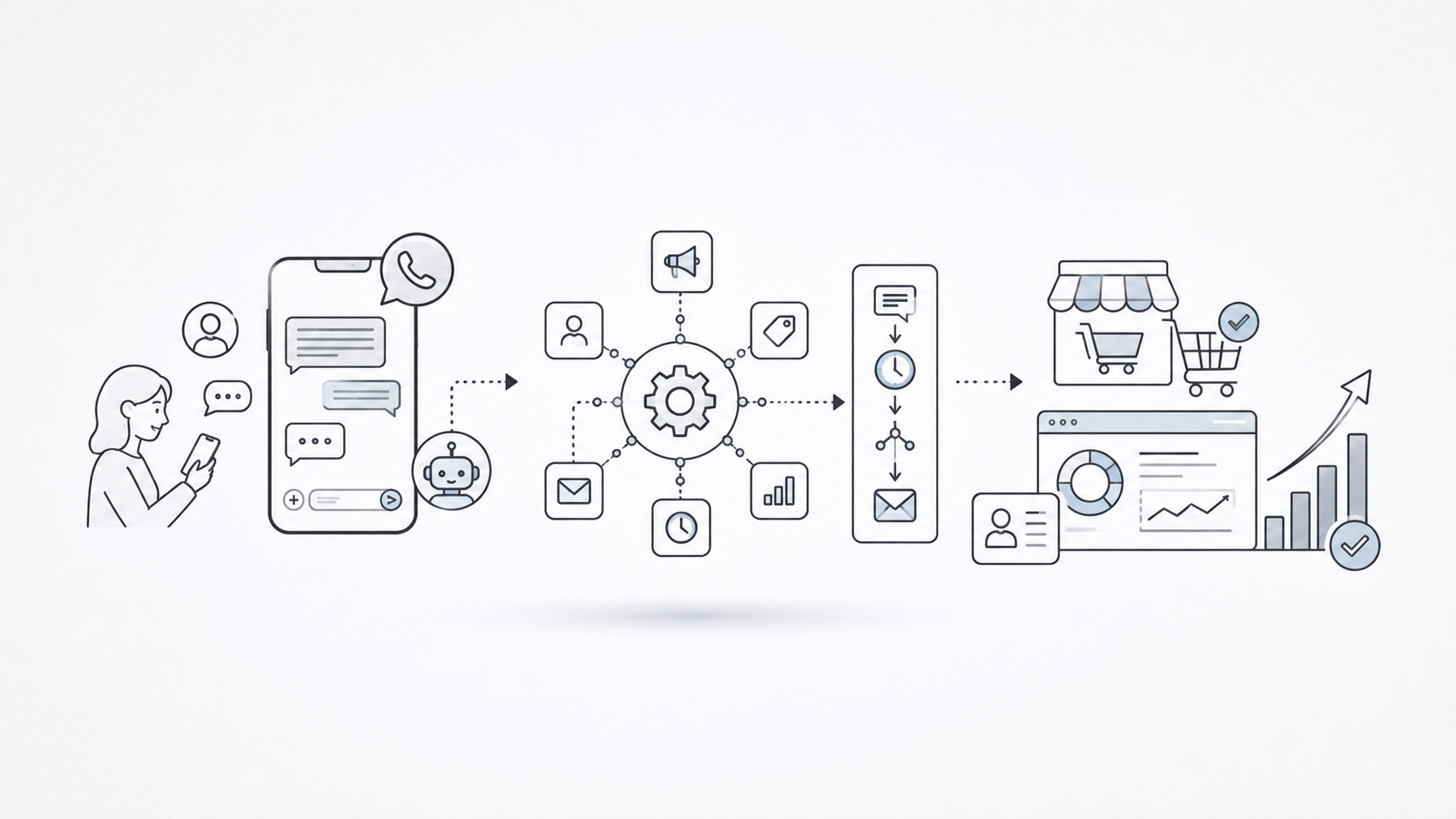
Failed Payment Recovery fails when one payment decline makes a good customer feel like a risk instead of a customer.
That is the mistake I’d fix first. Most failed payment recovery problems are not caused by one bad reminder email. They happen because every decline gets pushed through the same workflow: retry, warn, warn again, suspend. That might collect some payments, but it also turns a solvable billing issue into a retention problem.
You need a recovery ladder. Classify the failed payment, retry quietly when the failure is recoverable, make the update path easy, then escalate channels only when the customer actually needs help. Email, SMS, in-app messages, WhatsApp, and voice all have a place. They should not all fire at once.
Failed payment recovery is a retention problem, not just a billing problem
Failed payment recovery is the process of recovering revenue after a payment attempt fails because of an expired card, insufficient funds, fraud flag, processor issue, missing payment method, authentication requirement, or outdated billing details.
The key point: this is different from voluntary churn. In voluntary churn, the customer chooses to leave. In involuntary churn, the customer can lose access even though they may still want the product. Paddle frames involuntary churn around errors such as expired cards, insufficient funds, and communication issues, and notes that customers often do not know a payment failed until access is interrupted or support gets involved in its guide to payment failures and churn.
That is why tone and timing matter. A failed payment message is not only an accounts-receivable notice. It is a customer moment.
For SaaS teams, that moment can decide whether a healthy account keeps using the product or gets dragged into support. For ecommerce and subscription commerce teams, it can decide whether an order, refill, membership, or repeat purchase is saved.
My rule is simple: be quiet when the payment can be recovered silently, be helpful when the customer must act, and be firm only when the service genuinely needs to pause.
How we built this recovery playbook
This playbook is based on public payment-recovery guidance and vendor documentation current as of May 2026, including Stripe Billing’s retry behavior, Paddle’s payment-failure guidance, and current dunning best-practice guides from DunningBee, ChurnWard, and Rezoki.
I judged each recommendation on five practical dimensions:
-
Whether it preserves customer trust
-
Whether it changes based on decline type
-
Whether it reduces customer effort
-
Whether it fits common SaaS, subscription, and ecommerce recovery workflows
-
Whether it can be measured without vague “saved revenue” claims
This is not a hands-on software review. It is a source-grounded operating guide for teams that need to recover failed payments without burning the relationship they are trying to save.
Before you send a single reminder, classify the failure
If you take one thing from this article, take this: do not send every failed payment into the same dunning sequence.
I’d start by classifying the failure into a few operational buckets:
|
Failure type |
What it usually means |
Best first move |
|
Soft decline |
Temporary issue such as insufficient funds, issuer downtime, or network failure |
Retry intelligently before contacting the customer |
|
Hard decline |
Issuer rejects the transaction in a way that usually requires customer action |
Ask for a new payment method instead of repeated retries |
|
Expired card |
Payment details are stale |
Send a direct update link and show the issue in-app |
|
Authentication required |
Customer must approve or authenticate the payment |
Explain the required action clearly |
|
Fraud or risk flag |
Issuer or payment system blocks the attempt |
Route carefully; do not pressure the customer |
|
Processor error |
The payment system failed or timed out |
Retry silently and monitor processor health |
Some retries are useful. Others are just noise.
Stripe Billing can automatically retry failed subscription and invoice payments, but it does not retry when no payment method is available, when the issuer returns certain hard decline codes, or in other specific cases such as India-issued cards and disconnected Connect accounts. Stripe also notes that hard declines require a new payment method before payment can execute again in its Smart Retries documentation.
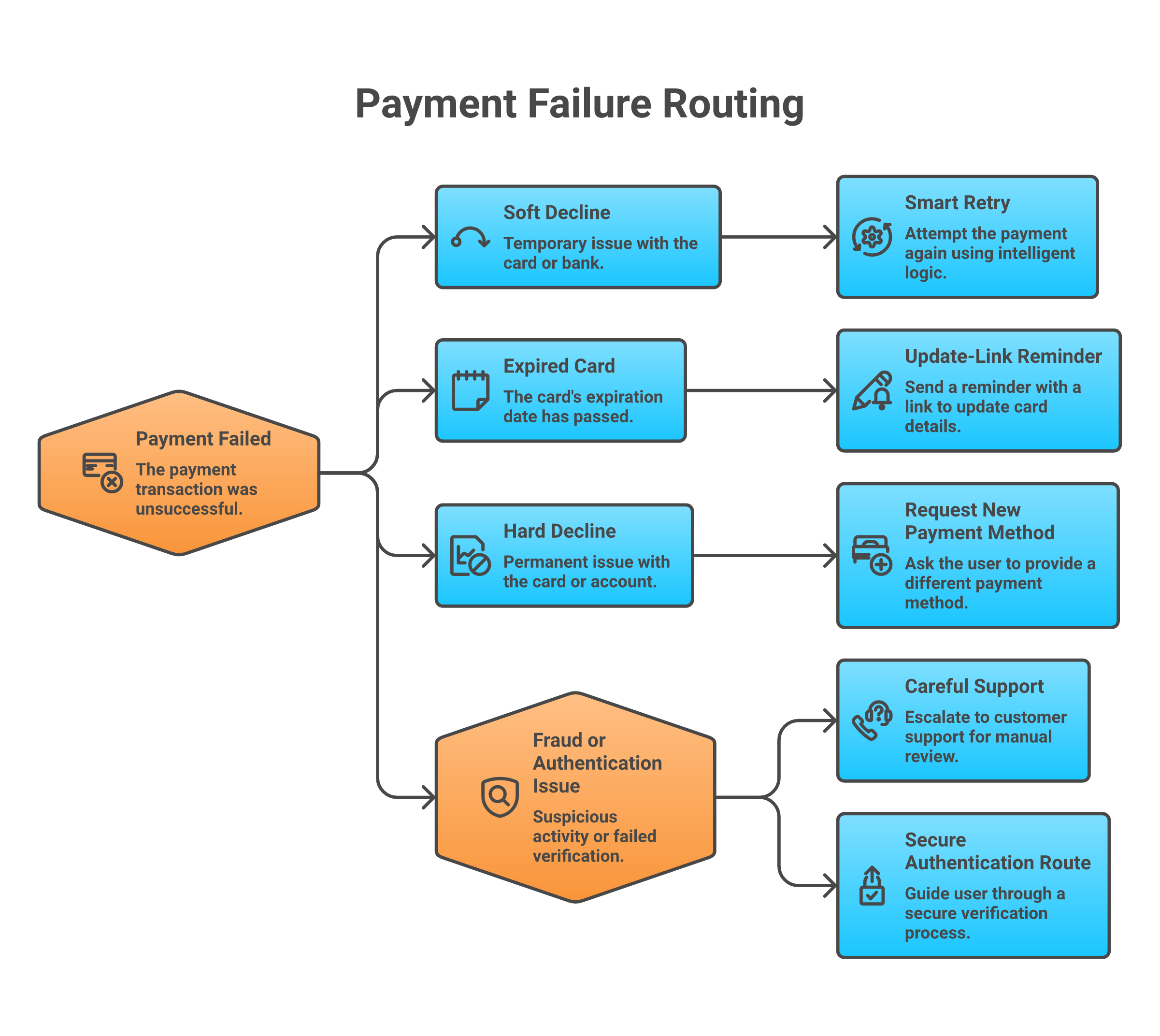
The practical rule: retry soft failures, ask for action on hard failures, and give risky or confusing failures a support-aware path.
1. Retry recoverable failures before you contact the customer
The first recovery move should often be invisible.
If the decline is temporary, a retry can recover payment without interrupting the customer or making billing feel broken. That is especially true for insufficient funds, issuer downtime, temporary network errors, and some authorization issues.
Good retry logic accounts for:
-
Decline code
-
Local time zone
-
Customer segment
-
Payment method
-
Attempt count
-
Maximum recovery window
Stripe’s Smart Retries chooses retry timing using dynamic signals and lets teams set a retry policy by number of retries and duration. Stripe lists a default recommendation of eight tries over two weeks, while also allowing different policies for customer segments through automations in its revenue recovery retry guidance.
I would not copy that cadence blindly. A low-cost consumer subscription, a high-value B2B account, and a one-time ecommerce order need different treatment.
Use these guardrails:
-
Retry soft declines before sending a reminder.
-
Stop retrying hard declines unless the payment method changes.
-
Cap attempts so the customer does not see a string of failed bank notifications.
-
Segment high-value accounts into a more careful recovery path.
-
Log attempt count and outcome so finance and retention teams can see what is working.
Silent recovery is the most customer-friendly option when it works. The mistake is treating retry logic as the whole strategy.
2. Make the payment update path one click
When the customer needs to act, the update path should be almost boring.
Send them to the exact place where they can fix the payment method. Not a login screen. Not a generic billing page. Not a help article. A secure, mobile-friendly update page with one clear action.
Paddle recommends reducing friction by making it easy and fast for customers to update credit card information, including avoiding unnecessary login or phone steps where possible in its payment failure recovery guidance. DunningBee makes the same practical point for Stripe workflows: retries and emails matter, but card-update UX is often where recovery is won or lost in its Stripe dunning guide.
A good update path includes:
-
A secure payment update link
-
Customer and invoice context
-
Mobile-friendly form fields
-
No unnecessary login wall where your payment setup allows it
-
Support contact for confused customers
-
Immediate confirmation after the update succeeds
I’d be strict here: do not ask customers to reply with card details over email, SMS, WhatsApp, or phone. Those channels should route the customer to a secure payment flow, not become the place where payment data moves around.
If your first reminder gets clicks but few completed updates, the payment page may be the real blocker.
3. Send a clear first message while the context is fresh
The first customer-facing message should be calm, specific, and useful.
The customer should understand three things in a few seconds:
-
What happened
-
What they need to do
-
What happens if they do nothing
Here is the pattern I’d use:
We could not process your payment for [product/account/order]. Please update your payment method here: [secure link]. We will retry your payment after the update. Your account remains active during the grace period.
That message works because it does not shame the customer. It does not imply intent. It does not bury the action.
Avoid messages like:
Your payment failed. Your account will be cancelled unless you pay immediately.
That may get attention, but it also sounds like a threat. It can create support tickets from customers who would have fixed the issue with a calmer message.
For ecommerce and subscription commerce, make the first message order-specific:
We could not complete payment for your upcoming order. Update your payment method here so we can ship it on time.
For B2B SaaS, include the account owner, workspace name, invoice number, or renewal context when it helps the reader understand the impact.
Keep the first message single-purpose. Do not add upgrade offers, product announcements, surveys, or unrelated CTAs.
4. Use a short dunning sequence instead of one desperate email
One reminder is easy to miss. Ten reminders feel punitive.
A customer-safe dunning sequence sits between those extremes. It gives the customer several chances to act without making a billing issue feel like a daily interruption.
A practical sequence:
|
Timing |
Message purpose |
Channel |
|
Day 0 |
Confirm the issue and give a secure update link |
Email, in-app |
|
Day 3 or 4 |
Remind the customer while access or order status is still recoverable |
Email, in-app |
|
Day 7 or 8 |
Add urgency and explain the grace period or shipment impact |
Email, SMS or WhatsApp where consent exists |
|
Final notice |
Explain pause, downgrade, or cancellation path without threats |
Email plus account-owner route for B2B |
This is a starting point, not a universal schedule. ChurnWard emphasizes segmented, measured dunning in its SaaS dunning best-practices guide. Rezoki covers smart retries, dunning messages, in-app notifications, and escalation as separate recovery levers in its failed payment recovery guide.
The sequence should change based on value, payment frequency, product criticality, and customer relationship.
A $19 monthly subscription can use a short automated sequence. A $40,000 annual account needs owner routing, CRM context, and human review before service is interrupted.
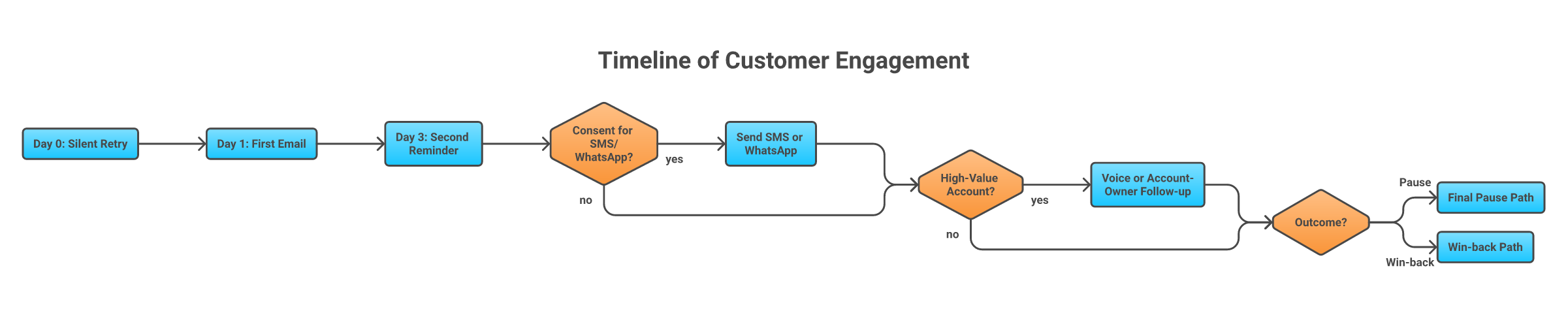
5. Add SMS or WhatsApp when the customer is likely to miss email
Email is easy to ignore.
SMS and WhatsApp can help when the customer is high-intent, time-sensitive, or unlikely to see a billing email. They are useful for ecommerce orders, delivery-tied subscriptions, and B2B accounts where the billing contact is not the daily user.
Use these channels carefully:
-
Confirm consent before sending.
-
Keep the message short.
-
Include one secure update link.
-
Identify the product or order clearly.
-
Stop once the payment is recovered.
Do not copy your email into SMS. The job is not to explain every billing detail. The job is to get the customer to the secure payment action.
Good SMS or WhatsApp phrasing:
We could not process payment for your [product/order]. You can update it securely here: [link]. Reply HELP if you need support.
Poor phrasing:
Urgent. Your payment failed and your account is at risk. Pay now.
The second version may drive clicks, but it also sounds like a scam.Trust is part of conversion.
6. Use voice follow-up for high-value or time-sensitive accounts
Voice is not the first move for every failed payment.
I’d use voice when the customer may need help, when email is likely to be missed, or when the revenue moment is valuable enough to deserve a more direct touch. Think enterprise SaaS accounts, important renewals, high-value subscription boxes, urgent delivery windows, or payment failures that are about to interrupt service.
The rule is simple: call to help the customer resolve the issue faster, not to pressure them.
A good voice recovery flow:
-
The payment fails and the system classifies the decline.
-
Soft declines go through retry logic first.
-
If customer action is needed, email or in-app messages send a secure update link.
-
If the customer does not respond and the account or order value justifies escalation, a voice agent or human rep calls.
-
The call explains the issue and sends the secure link by SMS, email, or WhatsApp.
-
The customer is routed to support if they are confused, unhappy, or disputing the charge.
This is where a tool like Outcraft AI fits naturally. It works around revenue moments where someone signs up, abandons checkout, misses a payment, stops using a product, or asks a question, then follows up across calls, SMS, email, and WhatsApp.
For failed payment recovery, that means a missed payment can trigger patient outreach instead of leaving billing, support, and account teams to chase manually. The AI voice agent should not collect card details over the phone. It should explain the issue, send a secure payment link, and route edge cases to a person.
That makes voice a recovery channel, not a collections tactic.If a call helps them fix an urgent problem faster, it belongs in the workflow.
7. Show the issue inside the product before access breaks
In-app reminders work because they reach the customer while the product still has context.
If the user is actively logging in, do not rely only on a billing email that may have gone to a finance alias. Show a calm banner or modal before access breaks.
Good in-app payment recovery:
-
Appears before the account is suspended
-
Names the billing issue clearly
-
Gives the account owner a direct update path
-
Lets non-admin users notify an admin
-
Explains the grace period
-
Removes itself after recovery
For B2B SaaS, account roles matter. The daily user may not have billing permissions, so let them alert the admin or account owner.
For consumer subscriptions, make the recovery action fit the device. If most failed-payment customers are on mobile, the update page and authentication flow need to work cleanly on mobile.
Access controls should be gradual where possible. A warning banner is better than a sudden lockout. Read-only access is better than deleting value. If you have to restrict access, make the path back obvious.
8. Prevent the next failure before it happens
Failed payment recovery should feed prevention.
Every recovered payment tells you something about the next failure you can avoid. If cards expire, send pre-dunning reminders. If account owners miss billing emails, fix contact hygiene.
Prevention tactics worth using:
-
Expiring-card reminders before renewal
-
Account updater services where available
-
Backup payment methods
-
Alternate payment methods by market
-
Billing-contact verification during onboarding
-
Annual-plan offers for customers who prefer fewer payment events
-
Payment-failure alerts to account owners or customer success for high-value accounts
The prevention mindset is simple: fewer failed payments means fewer awkward conversations.
9. Pause, downgrade, or win back instead of cancelling too fast
Not every failed payment should end in cancellation.
Sometimes the customer needs a new card. Sometimes they need procurement approval. Sometimes they no longer need the full plan but would keep a smaller one.
Give your recovery workflow an off-ramp:
-
Pause the subscription instead of cancelling immediately.
-
Downgrade where the product model allows it.
-
Preserve data for a defined period.
-
Route high-value accounts to customer success.
-
Ask whether the customer still wants the product.
-
Use win-back messaging after a pause instead of treating the account as lost.
For some businesses, fast cancellation reduces risk. For others, it destroys relationships that a pause, downgrade, or assisted update could have saved.
I’d avoid instant punishment unless the product, fraud risk, or cost structure truly requires it. The better move is a clear policy that protects revenue and respects the customer.
A customer-safe failed payment recovery workflow
Here is the full ladder in operating terms:
-
Detect the failed payment in real time.
-
Classify the failure by decline type and customer segment.
-
Retry silently when the failure is recoverable.
-
Send a direct update link when the customer needs to act.
-
Show the issue in-app before access breaks.
-
Escalate from email to SMS or WhatsApp when consent and urgency justify it.
-
Use voice for high-value, time-sensitive, or support-heavy cases.
-
Pause, downgrade, or route to win-back when recovery fails.
-
Measure outcomes by segment and channel.
This workflow keeps the recovery motion proportional. The customer with a temporary issuer failure should not get a phone call. The enterprise customer about to lose access should not get only one automated email.
Where Outcraft AI fits in the recovery workflow
Outcraft AI is most useful after your billing system has detected the payment failure and your retry logic has decided customer action is needed.
That is the revenue moment. Someone misses a payment, and the next best action depends on decline type, account value, customer state, consent, channel history, and urgency.
Outcraft can help teams engage that customer across calls, SMS, email, and WhatsApp, then route the conversation toward the next best outcome: updated payment method, support handoff, saved renewal, recovered order, or retained customer. The fit is strongest when email alone is too passive and manual follow-up would create support or sales workload.
I would not put Outcraft in front of weak billing hygiene. You still need clean billing data, retry rules, secure payment links, consent handling, and a clear stop policy. Without those, adding more channels just spreads a messy process across more places.
Use Outcraft where timely, respectful follow-up can recover revenue without making customers feel chased.
Metrics to track every month
Failed payment recovery only improves when you can see what is happening.
Track these metrics monthly:
|
Metric |
What it tells you |
|
Recovery rate |
Percentage of failed payments recovered |
|
Recovered revenue |
Revenue saved from successful recovery |
|
Time to recovery |
How long it takes customers to resolve the failure |
|
Retry success rate |
Whether silent retries are doing useful work |
|
Update-link completion rate |
Whether the payment update path is working |
|
Channel success rate |
Which channels recover payments by segment |
|
Hard vs soft decline mix |
Whether your failures are mostly retryable or action-required |
|
Churn after recovery |
Whether recovered customers stay healthy |
|
Complaint and unsubscribe rate |
Whether the recovery motion is too aggressive |
Use two layers of proof: workflow diagnostics and commercial proof. Recovery rate, retry success, and update-link completion explain where the process is breaking. Recovered revenue, churn after recovery, and complaint or unsubscribe rate explain whether the workflow is protecting the business without damaging trust.
The last two metrics are easy to ignore. If recovery rate rises while complaints rise too, you may be collecting payments at the cost of trust.
FAQs about failed payment recovery
What is failed payment recovery?
Failed payment recovery is the process of recovering a payment after the first attempt fails. It usually includes retry logic, payment-update links, dunning messages, in-app notices, SMS or WhatsApp reminders, voice follow-up for selected accounts, and pause or win-back paths when recovery fails.
How many retries are too many?
It depends on decline type and customer segment. Soft declines can justify several timed retries. Hard declines should usually stop until the customer provides a new payment method. Stripe’s default Smart Retries setting is eight tries within two weeks, but your cadence should reflect account value, payment method, and customer experience risk.
What is dunning?
Dunning is the process of contacting customers about failed or overdue payments. Good dunning is clear, respectful, and action-oriented. Bad dunning repeats the same warning until the customer either pays, unsubscribes, complains, or leaves.
Should you call customers after failed payments?
Sometimes. Voice follow-up is best for high-value, time-sensitive, or support-heavy cases where a call helps the customer resolve the issue faster. It is not a good default for every failed card. When you do call, send the customer to a secure payment link and do not ask for card details on the call.
How do you recover payments without hurting trust?
Classify the failure first, retry recoverable payments silently, make the update path one click, use calm reminders, escalate channels only when justified, and give customers a pause or win-back path instead of cancelling too quickly.

Summarize with AI