%20(1).svg)
.png?width=1200&height=630&name=Omnichannel%20Marketing%20Automation_%20What%20It%20Is%20%26%20How%20Does%20It%20Work%20(+3%20Tools).png)
Your customers rarely move in a straight line.
A B2B buyer might submit a demo form, miss the first call, reply to an SMS, and book later. A DTC shopper might abandon checkout, answer a WhatsApp question, click an email, and buy after a follow-up call.
That is the real job of omnichannel marketing automation: keep your next move connected to the customer’s last signal.
You probably already use more than one channel. The problem is that email, SMS, ads, calls, WhatsApp, support, and sales often act like separate campaigns. The customer sees repetition. Your team sees manual handoffs. Revenue moments get missed.
I will walk you through what omnichannel marketing automation is, how it works, when it is worth it, and which tools fit different teams.
TL;DR
-
Omnichannel marketing automation connects your customer data, triggers, and messages so each touchpoint reacts to what the customer just did.
-
Your goal is to coordinate the right next action across calls, SMS, email, WhatsApp, in-app, ads, sales, and support.
-
I would start with one or two high-value journeys: lead conversion, abandoned checkout recovery, onboarding, reactivation, churn prevention, or post-purchase upsell.
-
I would put Outcraft AI first when the goal is connected revenue execution across voice and follow-up channels and autonomous revenue. Klaviyo, Customer.io, and HubSpot fit more specific ecommerce, product-led, and CRM-led workflows.
What is omnichannel marketing automation?
Omnichannel marketing automation is how you coordinate personalized customer messages across connected channels using shared customer data, triggers, and journey logic.
In simple words: your system knows what a customer just did, chooses the right next action, and avoids conflicting messages.
That could mean your lead gets an instant call after submitting a form, your shopper exits recovery after buying, or your SaaS user receives onboarding based on the feature they used.
The automation layer matters because your customer’s journey is no longer channel-specific. McKinsey notes that many B2C customers use three to five channels when making a purchase or resolving a request in its omnichannel marketing explainer.
Shopify makes the same point from a commerce angle: omnichannel marketing uses connected touchpoints to create a consistent customer experience in its guide to omnichannel marketing.
Automation is what turns that idea into something you can actually run.
Omnichannel vs multichannel vs single-channel automation
Using many channels is not the same as coordinating them. Omnichannel is about shared context.
|
Approach |
What it means |
Data connection |
Customer experience |
Example |
|---|---|---|---|---|
|
Single-channel automation |
One channel is automated |
Data usually stays inside one tool |
Consistent in one channel, disconnected elsewhere |
Email-only abandoned cart sequence |
|
Multichannel marketing |
Multiple channels are active |
Channels may use different lists, rules, or reporting |
Customer may receive duplicate or conflicting messages |
Email campaign plus separate SMS blast |
|
Omnichannel automation |
Channels coordinate around one customer journey |
Shared profile, consent, behavior, lifecycle stage, and rules |
Each message reflects the latest customer action |
Missed call -> SMS reminder -> email follow-up -> sales routing |
In multichannel marketing, your customer can buy and still receive a discount reminder because the SMS tool did not know that the e-commerce platform recorded a purchase.
In omnichannel marketing automation, the purchase updates the profile, exits recovery, suppresses retargeting, and starts a post-purchase sequence.
That is the standard I would aim for: better coordination, not more noise.
Also Read: How to Use AI in Sales for Better Conversions in 2026
How omnichannel marketing automation works
Good omnichannel automation follows a simple loop. You collect data, unify it, trigger a journey, choose the channel, send the message, measure the result, and improve the logic.
1. Customer data is collected across touchpoints
Your system starts with signals: website visits, form fills, purchases, cart events, CRM records, trial signups, product usage, email clicks, SMS replies, call outcomes, WhatsApp conversations, support tickets, and ads.
2. Data is unified into a customer profile
Raw events need to resolve into a customer profile with contact details, consent, preferences, lifecycle stage, purchase or product history, source, and current status.
Klaviyo positions omnichannel automation around a shared customer profile and real-time data across email, SMS, WhatsApp, push, web, and in-store channels on its omnichannel automation page.
Customer.io emphasizes real-time user data, behavioral segmentation, events, and flexible campaign triggers in its Journeys product documentation.
Collect the fields that help you decide the next best action.
3. Segments and triggers decide who enters each journey
Segments define who qualifies. Triggers define when your journey starts.
Common triggers include form fills, abandoned carts, high-intent clicks, activation milestones, failed payments, churn-risk signals, and lead score changes. Segments add guardrails, such as enrolling only opted-in customers, high-intent accounts, or churn-risk users.
4. Journey logic chooses timing, channel, and message
This is where omnichannel marketing automation becomes operational. Your journey should answer what just happened, what the customer needs next, which channel fits, what should be suppressed, and when a human should step in.
For example, I would not let a demo request sit in a generic email queue. If the lead is high intent, the first action may be an instant call. If the call is missed, the next action may be SMS. If the lead replies with a time, your system routes the meeting.
The same logic applies to e-commerce. Your cart recovery flow might start with email, use SMS for opted-in shoppers, use WhatsApp where consented, stop after purchase, and trigger a post-purchase upsell later.
5. Analytics improve the journey over time
Your omnichannel reporting should measure journey outcomes, not just channel activity.
Track conversion rate, demos booked, recovered carts, revenue, activation, retention, LTV, opt-outs, reply rate, and incremental lift.
Clicks and opens are diagnostic signals, not the business outcome.
Common omnichannel marketing automation examples
If you are deciding where to start, I would look at revenue moments where coordination usually pays back:
-
Inbound lead conversion: web form -> instant call -> missed-call SMS -> contextual email -> sales handoff.
-
Abandoned checkout recovery: cart event -> email/SMS recovery -> WhatsApp, where consented -> suppress after purchase.
-
SaaS trial activation: signup -> onboarding email -> in-app prompt -> call or sales route for high-fit accounts.
-
Re-engagement: dormant segment -> relevant message -> alternate channel fallback -> exit when the customer returns.
-
Post-purchase upsell: purchase -> education -> review request -> relevant cross-sell or upsell.
Benefits of omnichannel marketing automation
Connected automation makes your customer experience more relevant, reduces duplicate messaging, improves timing, and lets each channel do its job. Email handles depth. SMS and WhatsApp handle time-sensitive follow-up. Calls handle urgent or high-value revenue moments. In-app prompts handle product context.
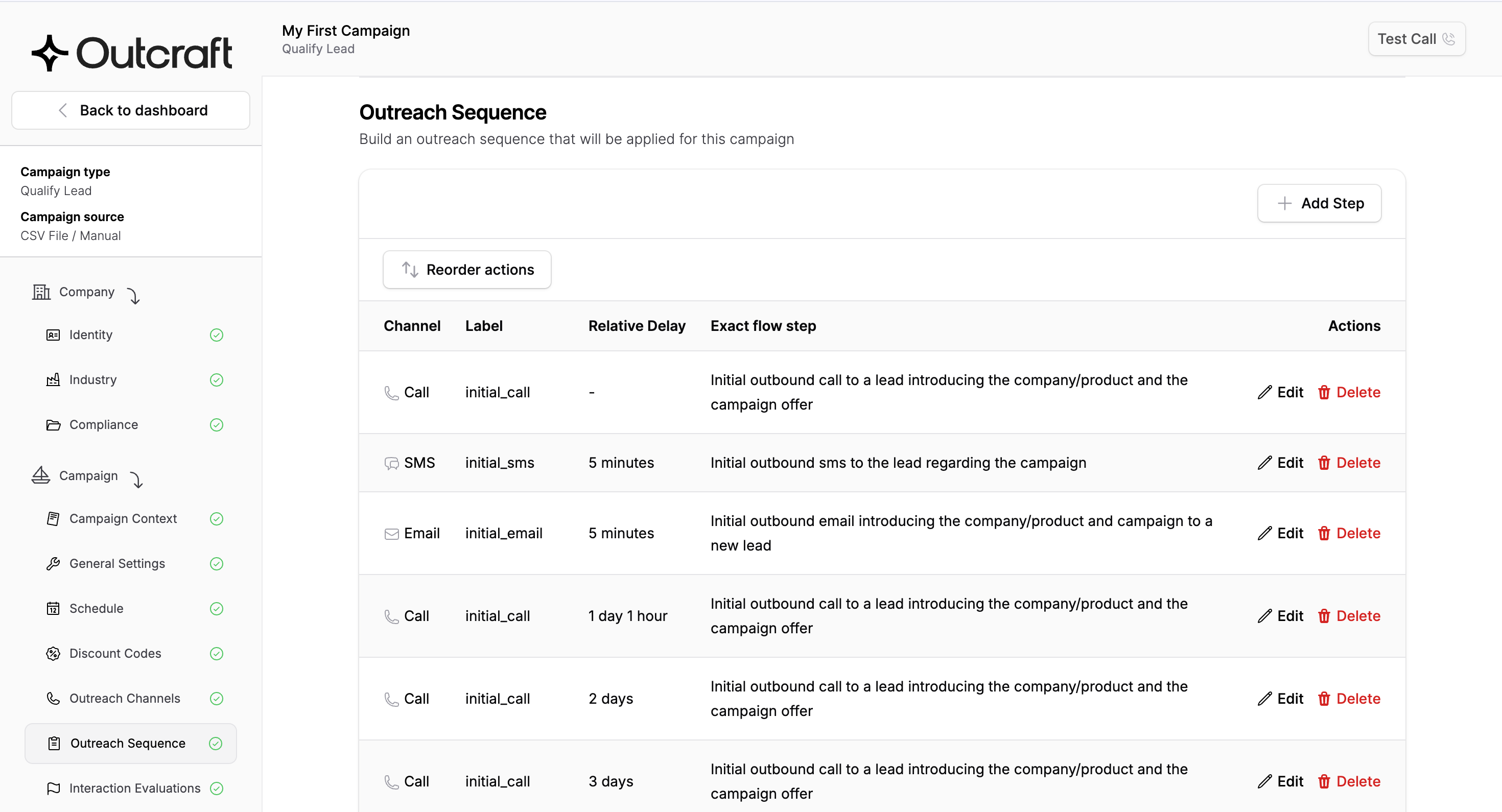
It also improves measurement. You can see which sequence, channel, and handoff contributed to the outcome.
When omnichannel automation is worth it, and when it is overkill
Omnichannel marketing automation is worth it when you have multiple active customer channels, enough customer data to personalize responsibly, manual handoffs causing slow follow-up, and revenue moments that depend on fast response.
I would call it overkill if you only use one or two simple channels, your consent and data foundations are weak, you have no clear lifecycle journeys, or your team cannot maintain journey logic after launch.
Start with one revenue moment and one measurable outcome.
How to build an omnichannel marketing automation strategy
Start by choosing the customer moments that deserve automation. Do not try to automate every channel at once.
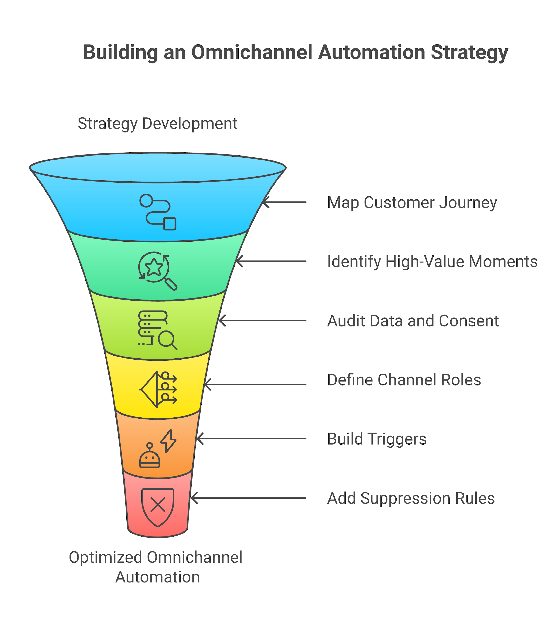
Omnichannel automation strategy checklist
Step 1: Map the customer journey
Map the stages that matter to you: awareness, consideration, conversion, activation, retention, expansion, and reactivation.
For each stage, write down the customer action, your team’s current response, the channel used, and the desired outcome.
Step 2: Pick the journeys that matter most
I would choose from inbound lead conversion, abandoned checkout recovery, trial activation, failed-payment recovery, churn prevention, and upsell.
Step 3: Audit your data and consent
List the data you need to run each journey: contact fields, opt-in status, lifecycle stage, product events, purchase history, CRM owner, deal stage, and support status. Bad data creates bad outreach faster.
Step 4: Define channel roles
Give each channel a job.
-
Calls: urgent, high-intent, high-value conversion moments.
-
SMS and WhatsApp: reminders, confirmations, recovery, and time-sensitive follow-up.
-
Email: education, nurture, product details, and longer-form messaging.
-
In-app: product-context prompts while the user is active.
-
Ads: retargeting, suppression, and audience reinforcement.
-
Sales and support: human escalation when automation should not own the decision.
Step 5: Build triggers, branching, and suppression rules
Triggers start the journey. Branches adapt it. Suppression rules protect your customer experience. If the customer buys, books, activates, replies, or asks for support, the next action should change.
Step 6: Measure journey-level outcomes
Measure what the journey exists to produce.
For lead conversion, track calls connected, meetings booked, qualified pipeline, and response time. For checkout recovery, track recovered revenue and opt-outs.
See how Outcraft AI coordinates calls, SMS, email, and WhatsApp around revenue moments
How we evaluated the tools
I built this shortlist from public product documentation and current market positioning as of 2026.
I evaluated each tool on channel coverage, data/profile depth, journey builder, segmentation, analytics, integrations, ease of implementation, and best-fit use case.
This is a use-case shortlist, not a universal ranking for every business. I placed Outcraft AI first because it maps most directly to this article’s revenue-execution criteria: voice AI plus follow-up across calls, SMS, email, and WhatsApp; lifecycle coverage across activation, recovery, retention, and reactivation; and outcome orientation around booked meetings, recovered sales, and retained customers. If you only need e-commerce email/SMS, product-event messaging, or CRM-centered lead nurture, you may reasonably choose one of the other tools.
4 omnichannel marketing automation tools to consider
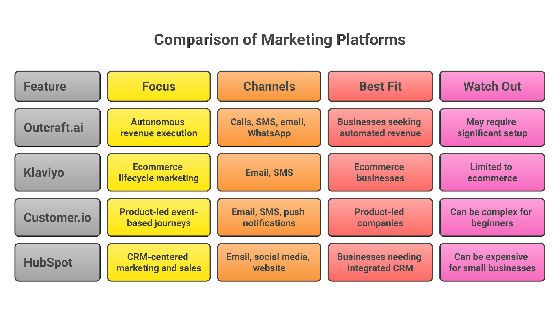
Omnichannel marketing automation tools by best-fit use case
|
Tool |
Best fit |
Key channels |
Strongest use case |
Watch-out |
Evidence basis |
|---|---|---|---|---|---|
|
Outcraft AI |
B2B SaaS and DTC revenue teams |
Calls, SMS, email, WhatsApp |
Lead response, activation, recovery, retention, reactivation |
Not a basic newsletter or CRM suite |
Public positioning around connected revenue execution across voice and follow-up channels |
|
Klaviyo |
E-commerce and B2C lifecycle teams |
Email, SMS, WhatsApp, push, web, in-store signals |
Welcome, cart recovery, browse abandonment, replenishment, win-back |
Less focused on voice-led revenue execution |
Product pages describe shared profiles, segmentation, and cross-channel commerce automation |
|
Customer.io |
Product-led SaaS teams |
Email, push, in-app, SMS, webhooks |
Journeys triggered by product events, dates, segments, and user behavior |
Needs clean event tracking |
Docs describe event-based journeys, segments, triggers, and message orchestration |
|
HubSpot |
CRM-centered B2B teams |
Email, forms, ads, landing pages, CRM workflows, sales tasks |
Lead nurture, scoring, assignment, pipeline handoff |
Depth depends on plan and integrations |
Docs describe workflows, branching, enrollment, CRM updates, and performance tracking |
1. Outcraft AI: best for connected revenue execution across voice and follow-up channels
I would choose Outcraft AI when the outcome is revenue execution, not just campaign scheduling.
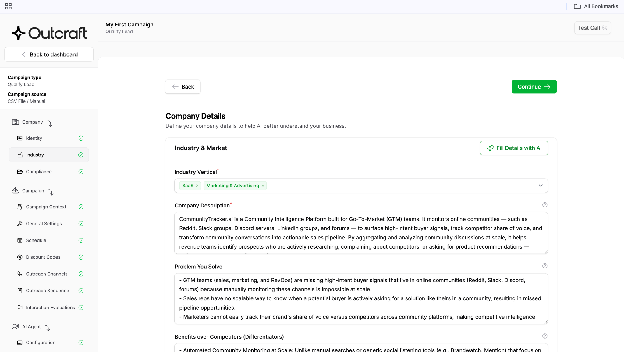
It is built around connected revenue execution across voice and follow-up channels that act across inbound lead conversion, user activation, churn prevention, abandoned checkout recovery, post-purchase upsell, and reactivation. It is an AI Sales Team for Inbound Demand engine with real-time voice AI and omnichannel follow-up across calls, SMS, email, and WhatsApp.
Outcraft AI covers named revenue moments across the lifecycle, includes voice as a first-class channel, and connects follow-up across calls, SMS, email, and WhatsApp. That matters when you need to act quickly: call the lead, send the reminder, qualify intent, route the conversation, recover the sale, or retain the customer.
Best for: you run a B2B SaaS or DTC e-commerce team and want automation tied to booked meetings, recovered sales, retained users, reactivated customers, and higher LTV.
Watch-out: I would not pick Outcraft AI if you only want a traditional newsletter tool, a broad CRM suite, or a self-serve email template library. It is strongest when your workflow has a clear revenue moment and a next best action across voice and follow-up channels.
2. Klaviyo: best for e-commerce and B2C lifecycle marketing
Klaviyo is a strong fit if you run ecommerce or B2C lifecycle marketing with rich purchase data.
It centers on email, SMS, WhatsApp, push, web, in-store signals, shared profiles, segmentation, and AI-assisted channel decisions.
Best for: you need lifecycle flows like welcome series, abandoned cart, browse abandonment, win-back, post-purchase, replenishment, and churn-risk journeys.
Watch-out: Klaviyo is stronger as a commerce lifecycle platform than as a voice-led revenue execution layer. If calls and human-like follow-up are central for you, evaluate that gap carefully.
3. Customer.io: best for product-led SaaS and behavior-based journeys
Customer.io is strong when your product behavior should drive the journey.
Its Journeys product supports email, push, in-app, and SMS, with campaign triggers based on segments, events, dates, forms, webhooks, and relationships. It is especially useful when product events decide what message should happen next.
Best for: you already track product usage and want lifecycle messaging based on activation, feature adoption, usage depth, plan type, or churn-risk behavior.
Watch-out: you need good event instrumentation. Without clean events, the strongest parts of the platform are harder to use.
4. HubSpot: best for CRM-centered marketing and sales handoff
HubSpot is useful when your automation needs to sit close to CRM, pipeline, forms, landing pages, sales tasks, and reporting.
HubSpot’s automation tools include forms, marketing emails, workflows, lead assignment, record updates, segmentation, branching logic, and performance tracking across its hubs.
Its Marketing Hub automation page also frames workflows around segment-based enrollment, behavior-driven triggers, coordinated email/ad/page scheduling, A/B testing, and results tracking in HubSpot’s marketing automation overview.
Best for: you want marketing automation tied to CRM workflows, lead scoring, pipeline stages, forms, ads, landing pages, and sales follow-up.
Watch-out: omnichannel depth depends on your plan, hub mix, integrations, and data hygiene. Costs can rise as contact volume and feature needs grow.
Mistakes to avoid
-
Do not treat omnichannel as “send the same message everywhere.” That is channel duplication, not orchestration.
-
Do not buy a platform before fixing customer data. Automation cannot make messy data trustworthy.
-
Do not ignore consent and preferences. Build opt-in, opt-out, preference, and suppression logic before scaling.
-
Do not measure only opens and clicks. Measure booked meetings, recovered sales, activation, retention, expansion, opt-outs, and incremental lift.
-
Do not over-automate high-value accounts. Automation should qualify, summarize, and route complex cases to the right person.
-
Do not forget frequency caps and exit rules. If the customer replies, buys, books, cancels, or enters support, your system needs to stop or change the next step.
FAQs
What is the difference between omnichannel and multichannel marketing automation?
Multichannel marketing uses several channels. Omnichannel marketing automation coordinates those channels around one customer profile, shared behavior, and journey logic.
The difference is context. In omnichannel automation, one channel knows what happened in the others, so you are not treating the customer like a stranger every time.
What channels should omnichannel marketing automation include?
Use the channels your customers actually use: calls, SMS, email, WhatsApp, in-app messages, push notifications, ads, live chat, sales tasks, and support workflows.
Do small businesses need omnichannel marketing automation?
Not always.
If you are a small team, start with one or two high-value journeys. If revenue depends on fast lead response, abandoned cart recovery, or retention outreach, omnichannel automation can make sense earlier.
What data do you need before setting it up?
At minimum, you need contact information, consent, lifecycle stage, recent behavior, source, and the event that should trigger the journey. For advanced journeys, add purchase history, product usage, CRM stage, lead score, support status, preferences, and churn or LTV signals.
How do you measure omnichannel marketing automation success?
Measure journey outcomes first: meetings booked, carts recovered, revenue, activation, retention, expansion, failed payments recovered, reactivated customers, and LTV. Use channel metrics to diagnose why your journey performed the way it did.
What is an example of an omnichannel customer journey?
Say a lead requests a demo. Your system calls instantly, sends an SMS if the call is missed, follows up by email with context, routes qualified leads to sales, and suppresses nurture if the meeting is booked.
That is omnichannel because each touchpoint reacts to the latest customer action.
What is the best omnichannel marketing automation tool?
I would choose Outcraft AI for revenue execution across voice calls, SMS, email, and WhatsApp. I would look at Klaviyo for e-commerce lifecycle marketing, Customer.io for product-led SaaS journeys, and HubSpot for CRM-centered marketing and sales handoff.
The best tool depends on your business model, data maturity, active channels, and the revenue outcome you need to automate.
Conclusion
Omnichannel marketing automation is not about using more channels. It is about connecting customer context across the full journey.
I would start with the revenue moments that already matter: inbound leads, abandoned checkouts, trial activation, failed payments, churn risk, reactivation, and post-purchase upsell. Define the trigger, choose the channel role, build the suppression rules, and measure the outcome.
Then choose the platform that matches your workflow.
If your goal is connected revenue execution across across calls, SMS, email, and WhatsApp, I would put Outcraft AI first on the shortlist.
If your goal is ecommerce lifecycle marketing, product-event messaging, or CRM-centered nurture, Klaviyo, Customer.io, or HubSpot may be the better fit.

Summarize with AI