.png?width=280&height=52&name=Untitled%20(280%20x%2052%20px).png "Untitled (280 x 52 px)")

.jpg?width=1920&height=1080&name=Medium%20Blogs%20(1).jpg)
Searching for the best AI lead generation software can lead you to three completely different types of products.
You might need a database to find people to contact.
You might need an outbound platform to reach those people across email and LinkedIn.
Or you may already have leads coming in and need a system that can respond, qualify, follow up, and turn that demand into meetings.
Those are very different problems.
A missing phone number won't be solved by an AI voice agent. A demo request sitting untouched for three hours won't be fixed by buying another contact database. And adding more mailboxes won't help if your targeting is poor.
So instead of ranking eleven tools as if they all do the same thing, I compared them based on where they enter the lead-generation process and what problem they actually solve.
TL;DR: Which AI lead generation software should you choose?
My shortlist:
- Outcraft AI - best for turning inbound leads into qualified meetings
- Salesforge - best for AI-powered LinkedIn + email outbound
- Apollo - best for affordable B2B contact discovery
- Clay - best for custom enrichment and AI research workflows
- Instantly - best for scaling cold-email sending
- Smartlead - best for agency cold-email operations
- Leadfeeder - best for identifying companies visiting your website
- HubSpot Sales Hub - best for managing leads inside a CRM
- 6sense - best for enterprise account intent
- ZoomInfo - best for enterprise sales intelligence
- Cognism - best for UK and European prospecting
Disclosure: We build Outcraft. I've kept it at #1 because this comparison looks beyond contact generation alone and includes what happens after a lead enters your funnel. I've tried to apply the same limitations and buying criteria to every product listed.
How I evaluated these AI lead generation tools
I evaluated the products around six questions:
- Where does the product enter the sales process?
- What does its AI actually do?
- What can it execute natively?
- What still requires a human?
- How is usage priced?
- Who should buy it, and who shouldn't?
I also paid particular attention to hidden operational costs.
A product advertised at $49 per month might also require additional mailboxes, enrichment credits, social-action credits, implementation work, or another CRM subscription.
That usually matters more than a long feature checklist.
I did not run a controlled contact-accuracy study across all eleven products, so I would not treat this ranking as evidence that one database has universally better records than another. If contact data matters to you, test competing vendors against the exact same sample from your target market.
The 11 best AI lead generation software tools
|
If you need to… |
I'd choose |
Why |
|
Turn inbound leads into qualified meetings |
Outcraft AI |
Responds, qualifies and follows up across voice, SMS, email and WhatsApp |
|
Run LinkedIn + email outbound |
Salesforge |
Coordinates both channels inside the same outbound workflow |
|
Find affordable B2B contacts |
Apollo |
Large database plus basic outreach in one product |
|
Build custom enrichment workflows |
Clay |
Combines multiple providers with flexible AI research |
|
Scale cold-email sending |
Instantly |
Strong mailbox and email campaign infrastructure |
|
Manage cold email across client accounts |
Smartlead |
Built around sender rotation and client workspaces |
|
Identify companies visiting your website |
Leadfeeder |
Converts anonymous website activity into account-level intent |
|
Manage leads and pipeline |
HubSpot Sales Hub |
Keeps ownership, activity and pipeline on one CRM record |
|
Prioritize enterprise accounts showing intent |
6sense |
Predictive account intelligence for ABM teams |
|
Buy enterprise sales intelligence |
ZoomInfo |
Broad company, contact and account intelligence |
|
Prospect into the UK and Europe |
Cognism |
Strong European data positioning and compliance controls |
The important point is that these aren't interchangeable.
If your team already has thousands of inbound leads, buying Apollo probably isn't the first thing I'd fix.
If you have no prospect list at all, Outcraft isn't the starting point either.
Start with the broken part of the funnel.
1. Outcraft AI: best for turning inbound leads into qualified meetings
Best for: Companies already generating demo requests, signups, inbound calls or other high-intent customer events.
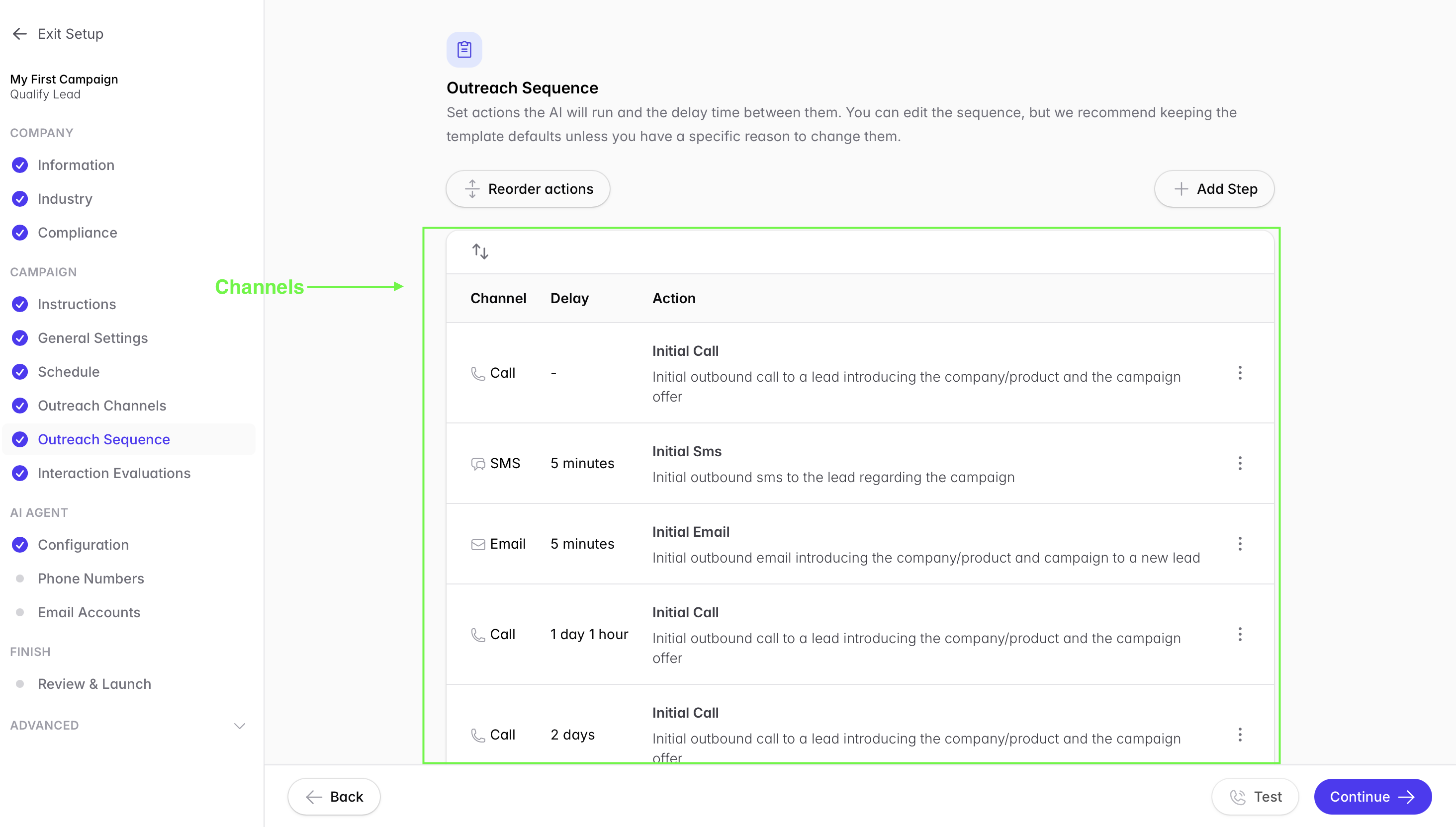
A lot of lead-generation software is built around finding more people. Outcraft starts from a different place: what happens after someone has already raised their hand.
Just think for a second: a prospect fills out your demo form, and instead of waiting in the CRM until a rep gets to it, Outcraft can kick off a call within minutes.
The AI agent can qualify the lead, answer relevant questions, and move the conversation toward a meeting. If they don’t pick up, it can keep the conversation going over SMS. Depending on your workflow, email or WhatsApp can also come into play for follow-up.
Once there’s an outcome, qualified, booked, disqualified, or needs human help, that result can flow back into your CRM.
That’s why I see Outcraft less as another lead database and more as the bridge between inbound intent and the next revenue action.
Where Outcraft stands out
The biggest advantage is channel continuity.
You don't necessarily want four disconnected automations where:
- one bot handles calls,
- another sends SMS,
- marketing owns email,
- and a rep eventually checks the CRM.
The value is in treating those interactions as one conversation.
For example:
Demo request → AI call → no answer → SMS follow-up → booking → CRM update
That's a much more concrete use case than simply saying “AI sales automation.”
Outcraft can also be used beyond the first demo request for workflows such as activation, payment recovery, and customer engagement, although I'd start with one high-value process before automating everything.
Limitations
Outcraft does not replace prospecting software.
If your primary problem is finding net-new contacts, I'd use a tool such as Apollo or Clay instead.
Voice AI also deserves proper testing before you allow it to handle valuable leads autonomously. I'd specifically test:
- interruptions
- unusual questions
- qualification boundaries
- call transfers
- CRM ownership
- failed handoffs
- when the AI escalates to a human
The public footprint is also smaller than older platforms such as HubSpot, ZoomInfo or Apollo.
Pricing
Outcraft uses contact-sales/demo-based pricing.
I would ask for pricing against your actual:
- inbound lead volume
- call volume
- channel mix
- CRM
- qualification complexity
- escalation requirements
Who should choose Outcraft?
I'd shortlist Outcraft if you're already paying to generate demand but leads are waiting too long for someone to respond.
It makes even more sense when the sales team is manually doing the same routine work repeatedly:
call → qualify → follow up → book → update CRM.
Who should skip it?
If you're trying to build your first prospect list, start with Apollo.
If your problem is cold-email infrastructure, look at Instantly or Smartlead.
If you mainly need LinkedIn + email outbound, I'd look at Salesforge.
Learn more about Outcraft's B2B workflows
2. Salesforge - Best for AI multichannel outreach
Best for: GTM teams and agencies running personalized outreach through email and LinkedIn.
Salesforge is an AI multichannel outreach tool where you can connect your email and LinkedIn accounts to run campaigns. You can use AI to personalize messages, manage replies and handle follow-ups from one place.
Where Salesforge stands out
- Multichannel sequences: Combine emails, LinkedIn connection requests and messages, with conditions that determine what happens next.
- AI personalization: Write messages using information from each prospect’s LinkedIn profile or website, with support for 20+ languages.
- Primebox: Manage email and LinkedIn replies in one inbox. Co-Pilot drafts replies for your approval. Auto-Pilot lets AI continue the conversation. You can also reply manually.
- MCP, CLI and API: Connect Salesforge with AI assistants such as Claude and Codex, or create custom campaign workflows.
- Unlimited senders and workspaces: It includes unlimited email senders, LinkedIn senders, users and workspaces.
- Deliverability tools: Unlimited premium email warm-up and mailbox rotation come with the subscription. Growth also includes ESP matching.
- Optional AI SDR: Agent Frank handles prospecting, research, outreach and follow-ups. Its Agent Intelligence feature uses your feedback to guide future messages.
Limitations
- Pro supports one user and one LinkedIn sender.
- Lead data, domains and mailbox hosting cost extra.
- Agent Frank is a separate purchase.
Pricing
Salesforge lists:
- Pro: $40/month on annual billing.
- Growth: $80/month on annual billing.
- 14-day free trial, with no permanent free plan.
Who should choose Salesforge?
I’d shortlist Salesforge for teams that want to use a multichannel outreach platform. Its unlimited users and workspaces also suit agencies managing multiple clients.
Who should skip it?
If you only need contact data or a CRM to track deals, Salesforge probably isn’t your first purchase. Its main use is running outreach and managing the conversations that follow.
3. Apollo — best for affordable B2B contact discovery
Best for: Startups and small sales teams that need contact data without immediately building a complicated GTM stack.
If I were starting outbound from scratch, Apollo would be one of the first products I'd evaluate.
The reason is simple:
It covers several early-stage requirements in one subscription.
You can search for companies and contacts, research prospects, enrich data and run basic outreach without immediately buying separate software for every step.
Where Apollo stands out
Apollo works particularly well when you're still figuring out your sales motion.
Instead of beginning with:
Clay + data providers + enrichment + sequencer + verification tools,
you can start with one database and discover what is actually missing later.
That makes it a practical starting point for founders and smaller outbound teams.
Limitations
The biggest issue with every database is the same:
A large database doesn't guarantee strong coverage in your market.
Before buying an annual subscription, I'd create a sample of accounts you genuinely want to reach.
Include:
- easy accounts
- obscure companies
- multiple countries
- senior roles
- difficult-to-find contacts
Then check how many usable records Apollo returns.
Phone information, enrichment and other data operations can also consume credits.
Pricing
Apollo Basic is listed at $49 per seat/month on annual billing.
Apollo also offers a free plan with limited credits and sequences.
Higher plans add more administrative and security functionality.
Watch minimum seat requirements on enterprise-oriented plans rather than looking only at the advertised per-seat number.
Who should choose Apollo?
Choose Apollo when you need:
contact discovery + initial research + basic outbound
without buying several tools.
Who should skip it?
If your own ICP sample performs poorly, don't buy it just because the total database is large.
4. Clay — best for custom enrichment and AI research workflows
Best for: GTM teams with someone who can build and maintain custom enrichment workflows.
Clay becomes useful when normal database filters stop being enough.
Suppose your ICP isn't simply:
SaaS companies with 50–500 employees in the US.
Maybe you need to know:
- whether the company recently hired its first RevOps leader
- whether it uses Salesforce
- whether its pricing page mentions enterprise
- whether it has expanded into Europe
- whether a specific role exists
- whether there is evidence of a particular GTM motion
Clay gives operators much more control over how those questions are answered.
Where Clay stands out
Clay combines enrichment from multiple data providers with custom logic and AI-powered research.
Claygent can research information from the web, while waterfall enrichment can query several providers until the required data is found.
That makes Clay particularly strong when your qualification logic can't be represented by basic database filters.
Limitations
Flexibility can turn into complexity very quickly.
I've seen enrichment workflows become impressive-looking chains of:
15 columns → 6 providers → 4 AI prompts → 3 scoring formulas
without meaningfully changing which prospects actually make the final list.
Every additional step should answer one question:
Will this information change what I do with the lead?
If not, remove it.
You also need someone who understands and maintains the workflow.
Pricing
Clay's Launch plan starts around $185/month when paid monthly, while annual billing displays a lower equivalent monthly rate.
Clay also offers a limited free plan.
Pricing can involve both actions and data credits, while external provider/API usage can create additional costs.
Who should choose Clay?
I'd choose Clay when better research materially changes your targeting.
Who should skip it?
If nobody on your team wants to own enrichment logic, buy a simpler database.
5. Instantly — best for scaling cold-email sending
Best for: Teams that already have a qualified prospect list and need more cold-email capacity.
Instantly makes the most sense after your targeting works.
Its core strength is cold-email operations:
- connect mailboxes
- warm inboxes
- rotate sending
- create campaigns
- manage email volume
There are also AI and lead-data products around the core outreach product.
Where Instantly stands out
Instantly's specialization can actually be useful.
If the problem you're solving is:
“Our current setup can't reliably operate the number of mailboxes and email campaigns we need,”
then a dedicated cold-email platform is easier to evaluate than an all-in-one suite.
Limitations
More email capacity doesn't fix bad targeting.
If your list produces poor replies at 2,000 sends per month, scaling to 20,000 usually gives you a larger version of the same problem.
I'd solve:
ICP → data quality → message → offer
before solving volume.
Also note that Instantly separates some capabilities into different subscriptions, so don't assume every AI, CRM or lead feature comes with the outreach plan.
Pricing
Email Outreach Growth is listed around $47/month, with limits on uploaded contacts and monthly emails.
Higher tiers increase volume significantly.
AI credits, CRM functionality, domains and mailboxes can add separate costs.
Who should choose Instantly?
Choose it when you already know whom you're contacting and need infrastructure to send more reliably.
Who should skip it?
Don't start here if your actual problem is figuring out who belongs on the list.
6. Smartlead — best for agency cold-email operations
Best for: Agencies and outbound teams managing multiple senders or client environments.
Smartlead overlaps with Instantly, but I'd lean toward Smartlead when the operational problem becomes more agency-like.
That means:
- many mailboxes
- several client accounts
- sender rotation
- campaign management
- reply categorization
- separate workspaces
Where Smartlead stands out
Client workspaces make more sense when several campaigns belong to different businesses.
AI can also categorize replies, including workflows using custom prompts and models.
I'd still spot-check categories such as:
- interested
- objection
- unsubscribe
- referral
- out of office
- ambiguous response
before allowing automation to depend completely on them.
Limitations
“Unlimited mailboxes” does not mean mailbox infrastructure costs disappear.
Domains, mailbox hosting, verification and other services can still sit outside the subscription.
Some AI functionality also deserves plan-level confirmation before buying.
Pricing
Smartlead Base starts at roughly $39/month.
Higher tiers increase contacts, sends and workspace functionality.
Unlimited Prime is positioned for much larger sending operations.
Who should choose Smartlead?
I'd shortlist it when managing senders and client accounts has become an operational workload of its own.
Who should skip it?
If you're one rep running a few campaigns, it may be more platform than you need.
7. Leadfeeder — best for identifying companies visiting your website
Best for: B2B businesses with meaningful website traffic that want to identify which accounts are showing interest.
Not every buyer fills out a form.
Someone may:
- visit your pricing page
- read three product pages
- come back two days later
- leave without ever identifying themselves
Leadfeeder helps turn some of that anonymous traffic into company-level account activity.
Where Leadfeeder stands out
This creates a different type of lead-generation signal.
You're no longer asking:
“Who fits our ICP?”
You're asking:
“Which companies fitting our ICP are already spending time on our website?”
That can be particularly useful for account-based sales.
Leadfeeder can prioritize companies and send account information into CRM workflows.
Limitations
Company identification is not the same as identifying the exact person who visited.
If Acme Corp visits your pricing page, that doesn't automatically prove:
Jane Smith, VP Sales, visited it.
Your sales team still needs to decide:
- whether the account matters
- who the right person is
- whether the activity justifies outreach
Pricing
Leadfeeder has a limited free tier.
Paid Discover plans start around €79/month on annual billing, while larger Scale plans increase account volumes and automation capabilities.
Who should choose Leadfeeder?
Choose it when website activity can genuinely change your reps' account priorities.
Who should skip it?
If your website receives little qualified traffic, solve acquisition first.
8. HubSpot Sales Hub — best for managing leads inside the CRM
Best for: Teams whose bigger problem is ownership, pipeline visibility and scattered sales activity.
HubSpot isn't primarily a lead database like Apollo or an intent platform like 6sense.
Its strength is becoming the place where sales activity is recorded and managed.
That matters once your sales motion involves:
- several reps
- lifecycle stages
- lead ownership
- pipeline reporting
- meetings
- email activity
- qualification
- handoffs
Where HubSpot stands out
Keeping activity close to the CRM record has a major operational advantage.
A manager doesn't have to reconstruct the sales process from five disconnected systems just to answer:
“What's happening with this account?”
HubSpot has also continued adding AI-driven prospecting and sales-assistance capabilities.
Limitations
Packaging can get complicated.
Don't assume that a feature shown in a HubSpot demo exists on the plan you're considering.
I'd create a short list of the workflows you actually need and ask exactly which tier unlocks each one.
Migration is another hidden cost.
If your team already has a CRM that works, replacing it can create more pain than purchasing a smaller point solution.
Pricing
HubSpot has a free CRM tier.
Sales Hub Starter has a standard price around $20 per seat/month, although promotions may reduce initial pricing.
Professional and Enterprise increase substantially and can include onboarding fees.
Who should choose HubSpot?
Choose HubSpot when lead ownership and sales activity need one reliable system of record.
Who should skip it?
If your CRM already works well, don't migrate just because one prospecting feature is missing.
9. 6sense — best for enterprise account intent
Best for: Established ABM teams deciding which accounts sales should prioritize.
6sense solves a completely different problem from Apollo.
Instead of primarily asking:
“Who can we contact?”
6sense helps larger GTM teams ask:
“Which target accounts appear to be moving closer to a buying decision?”
It combines account intelligence with predictive models and intent signals.
Where 6sense stands out
This is useful when sales doesn't suffer from a lack of accounts.
The company might already have thousands of accounts mapped.
The problem is knowing:
Which 100 should we care about right now?
That's where predictive account prioritization becomes useful.
Limitations
Intent is evidence.
It isn't proof of budget or an active buying process.
Someone still needs to determine what the signal means and how sales should respond.
And if the sales team ignores the scoring model and keeps working accounts in the same order, the platform can't create value simply by producing another dashboard.
Pricing
6sense uses quote-based pricing.
Public third-party procurement data suggests enterprise contracts can vary enormously depending on account volumes, modules and deployment scope.
I would not rely on those broad ranges as a substitute for an actual quote.
6sense also discontinued its previous free Sales Intelligence plan in August 2026.
Who should choose 6sense?
I'd shortlist 6sense when you already have an established ABM motion and someone owns account prioritization.
Who should skip it?
If you're a founder trying to build your first list of 500 prospects, buy a database.
10. ZoomInfo — best for enterprise sales intelligence
Best for: Larger sales organizations that want shared company, contact and account intelligence.
ZoomInfo has been one of the better-known names in B2B data for years.
Today its scope goes beyond simply finding an email address.
ZoomInfo combines contact information, company intelligence, account insights and AI-assisted sales preparation across a broader enterprise platform.
Where ZoomInfo stands out
The platform makes more sense when several sales teams need access to a common intelligence layer.
A rep can move beyond:
“Here's the VP Sales email.”
toward richer account preparation and territory intelligence.
ZoomInfo Copilot adds AI assistance around account research and sales preparation.
Limitations
Enterprise packaging is exactly why I'd inspect the quote carefully.
When a salesperson demonstrates:
- contact search
- an AI account summary
- intent
- integrations
- advanced reporting
ask which exact package unlocks each screen.
Otherwise you can easily evaluate one version of the product and purchase another.
Pricing
ZoomInfo does not publish a simple self-serve price for its core enterprise packages.
Pricing depends on licensing, credits, applications and contract scope.
Third-party contract observations vary significantly, which is another reason I'd request a scoped quote based on actual users and export requirements.
Who should choose ZoomInfo?
Choose it when several revenue teams will repeatedly use account and contact intelligence.
Who should skip it?
It is probably excessive for a one-off list-building project.
11. Cognism — best for UK and European prospecting
Best for: Sales teams prospecting heavily into the UK and Europe.
Cognism is another B2B sales-intelligence provider, but I'd pay particular attention to it when European data coverage and compliance processes matter to the buying decision.
It offers company/contact information alongside phone-verification and compliance-related controls such as do-not-call screening.
Where Cognism stands out
For a calling team, phone quality is something you can actually test.
I would take the same 50–100 target accounts and compare:
- number of relevant contacts found
- direct-dial availability
- current employment
- title accuracy
- reachable phone numbers
against another provider.
That's much more useful than comparing claimed database size.
Limitations
Compliance controls offered by the data vendor don't make every campaign automatically compliant.
Your company still owns how records are used and how outreach is conducted.
Cognism's packages also lean more toward sales teams than tiny one-person experiments.
Pricing
Cognism uses quote-based pricing.
Standard and Pro packages include multiple seats, while functionality such as intent, enrichment and additional data services depends on the package.
A small free sample is available, but a normal free SaaS plan isn't.
Who should choose Cognism?
I'd shortlist it when European contact and phone coverage justifies a territory-specific data evaluation.
Who should skip it?
For a tiny email-only experiment, I'd start with a lower-commitment database.
What AI lead generation stack would I build?
In practice, one tool rarely handles everything well.
Here are three stacks I'd consider depending on the maturity of the sales motion.
1. Lean founder stack: Apollo + HubSpot Free
If you're early, don't over-engineer your GTM stack.
I'd start with:
Apollo → contact discovery and initial outreach
HubSpot Free → CRM and pipeline
Then manually review the list and replies.
You're still learning:
- which companies respond
- which titles care
- which pain points resonate
- which objections appear
Automating everything before you understand those patterns can make learning slower rather than faster.
Upgrade once a clear bottleneck appears.
2. Scaling outbound stack: Clay + Salesforge
Once the ICP gets more specific, I'd consider:
Clay → research and enrichment
Salesforge → LinkedIn + email execution
Clay decides:
“Should this prospect make the list?”
Salesforge handles:
“How should we approach the prospect?”
I'd assign one person to own the connection between those two systems.
A bad enrichment record sitting in Clay is just a bad row.
Once it enters an automated campaign, your prospect sees it.
3. Inbound conversion stack: CRM + Outcraft
If you're already generating substantial inbound demand, I'd focus less on finding more names and more on what happens after someone raises their hand.
A simple workflow could be:
Demo request → CRM → Outcraft → call/SMS/email/WhatsApp → qualification → meeting → CRM disposition
The important metric isn't simply the number of calls placed.
I'd monitor:
- speed to first response
- qualification completion
- meetings booked
- failed handoffs
- human escalations
- lead-to-meeting conversion
That's where inbound automation should prove itself.
4. Enterprise ABM stack: 6sense + ZoomInfo or Cognism
For a mature enterprise GTM team:
6sense → Which accounts deserve attention?
ZoomInfo/Cognism → Who should we contact inside those accounts?
I wouldn't automatically purchase multiple data providers.
Run matched samples first.
If the second database doesn't materially improve coverage, you're paying twice for overlapping information.
What should you check before buying AI lead generation software?
Test data accuracy using the same accounts
Never let two database vendors use different samples.
Give each provider the same 50–100 accounts from your actual territory.
Then measure:
- relevant contacts found
- current job titles
- valid emails
- reachable phone numbers
- missing records
- incorrect records
I also like tracking:
cost per usable contact
rather than cost per credit.
A cheap record isn't cheap if someone spends five minutes fixing it.
Understand what “AI” actually does
Almost every sales product now mentions AI.
That doesn't tell you much.
Ask what the AI actually controls.
Does it:
- research prospects?
- write messages?
- select prospects?
- send messages?
- classify replies?
- answer prospects?
- qualify leads?
- make calls?
- choose channels?
- update the CRM?
The more decisions an AI system can make autonomously, the more important the review and escalation logic becomes.
Decide where humans stay involved
I wouldn't automate every account equally.
For high-value prospects, a false personalization claim or poorly handled objection can cost more than the time automation saves.
Define:
- which responses AI can handle
- when a human takes over
- which accounts always require review
- what happens when confidence is low
- who owns failed workflows
Voice agents deserve particularly careful testing around interruptions, transfers and unusual questions.
Model the full cost, not the advertised subscription
A sales tool might charge separately for:
- seats
- contacts
- email sends
- LinkedIn actions
- AI generations
- verification
- phone numbers
- enrichment
- inboxes
- domains
- CRM features
- intent modules
- implementation
Model one realistic month of activity before signing annually.
Then ask:
What happens when we exceed the limit?
Does the campaign stop?
Do credits automatically replenish?
Does another package get triggered?
Those questions matter once the system runs unattended.
Where Outcraft fits in the AI lead generation stack
I wouldn't use Outcraft to replace Apollo, Clay or another prospecting database.
I'd put it later in the funnel.
The prospect already exists.
The missing work is:
respond → qualify → follow up → book → record the outcome
For example:
A prospect requests a demo at 3:17 PM.
Outcraft triggers a call.
The prospect doesn't answer.
An SMS follows with enough context to continue the same interaction.
The prospect replies and agrees to meet.
The meeting is booked.
The CRM receives the result.
If the conversation becomes unusual or commercially sensitive, it moves to a named human owner.
That's the workflow I'd test first.
Not:
“Can AI replace my entire sales organization?”
But:
“Can this one high-volume inbound process run reliably without someone manually chasing every lead?”
Once that works, you can decide whether activation, recovery or other customer interactions deserve automation too.
Frequently asked questions
What is the best AI lead generation software?
It depends on where your sales process is broken.
I'd choose Outcraft for converting existing inbound demand, Salesforge for LinkedIn + email outbound, Apollo for affordable contact discovery and Clay for custom enrichment and research.
There is no single tool that is best at every stage.
Can AI generate B2B leads?
Yes, but “generate” can mean several things.
AI can identify relevant contacts, research accounts, detect intent, personalize outreach, execute follow-ups and qualify inbound prospects.
A contact added to a database is still not automatically a qualified sales opportunity.
What is the best AI lead generation software for a small business?
I'd usually start with Apollo if the business needs contact data and initial outreach.
HubSpot Free can cover basic CRM requirements.
If the business already receives significant inbound demand, a follow-up and qualification tool may be more valuable than another database.
Are there free AI lead generation tools?
Yes.
Apollo and Clay offer limited free plans, while Leadfeeder also has a free tier for website visitor identification.
Some other products offer trials rather than permanently free plans.
Always check the usage limits before building a workflow around a free tier.
Can AI replace an SDR?
Not completely.
AI can automate prospect research, personalization, routine outreach, follow-up, qualification and some reply handling.
Complex objections, negotiations, strategic accounts and unusual requests still benefit from human involvement.
I'd evaluate individual SDR tasks before making a headcount decision.
What is the difference between lead generation software and a CRM?
Lead-generation software helps you identify or engage potential buyers.
A CRM stores the relationship, records activity and tracks ownership and pipeline.
Some products overlap, but those are fundamentally different jobs.
How much does AI lead generation software cost?
It varies enormously.
Entry-level products such as Smartlead and Apollo can start around $39–$49 per month, while enterprise intelligence and intent platforms can require large annual contracts.
The full cost may also include seats, credits, domains, mailboxes, enrichment and implementation.
How should I test B2B contact data accuracy?
Give every vendor the same sample of 50–100 target accounts.
Compare:
- contact coverage
- current roles
- email validity
- phone reachability
- incorrect records
- manual verification time
I'd choose based on performance in your actual ICP rather than total database size.
Which AI lead generation software would I choose?
I wouldn't start by asking:
“Which platform has the most AI features?”
I'd ask:
“Where are we currently losing revenue?”
If you don't know whom to contact, start with Apollo.
If your targeting needs more sophisticated research, add Clay.
If email and LinkedIn execution are disconnected, evaluate Salesforge.
If you're trying to scale cold email, look at Instantly or Smartlead.
If you have useful website traffic but don't know which companies are visiting, consider Leadfeeder.
If you run enterprise ABM, 6sense, ZoomInfo or Cognism may make more sense.
And if you're already generating inbound requests but can't reliably respond, qualify and follow up with every lead, that's where I'd evaluate Outcraft.
The best lead-generation stack isn't the one with the most tools.
It's the one where every tool fixes a measurable gap in the path from buyer intent to revenue.
.svg)
Ready to Recover More Revenue?
See how Outcraft's AI agents turn failed payments, abandoned checkouts, and support conversations into revenue.

Summarize with AI