



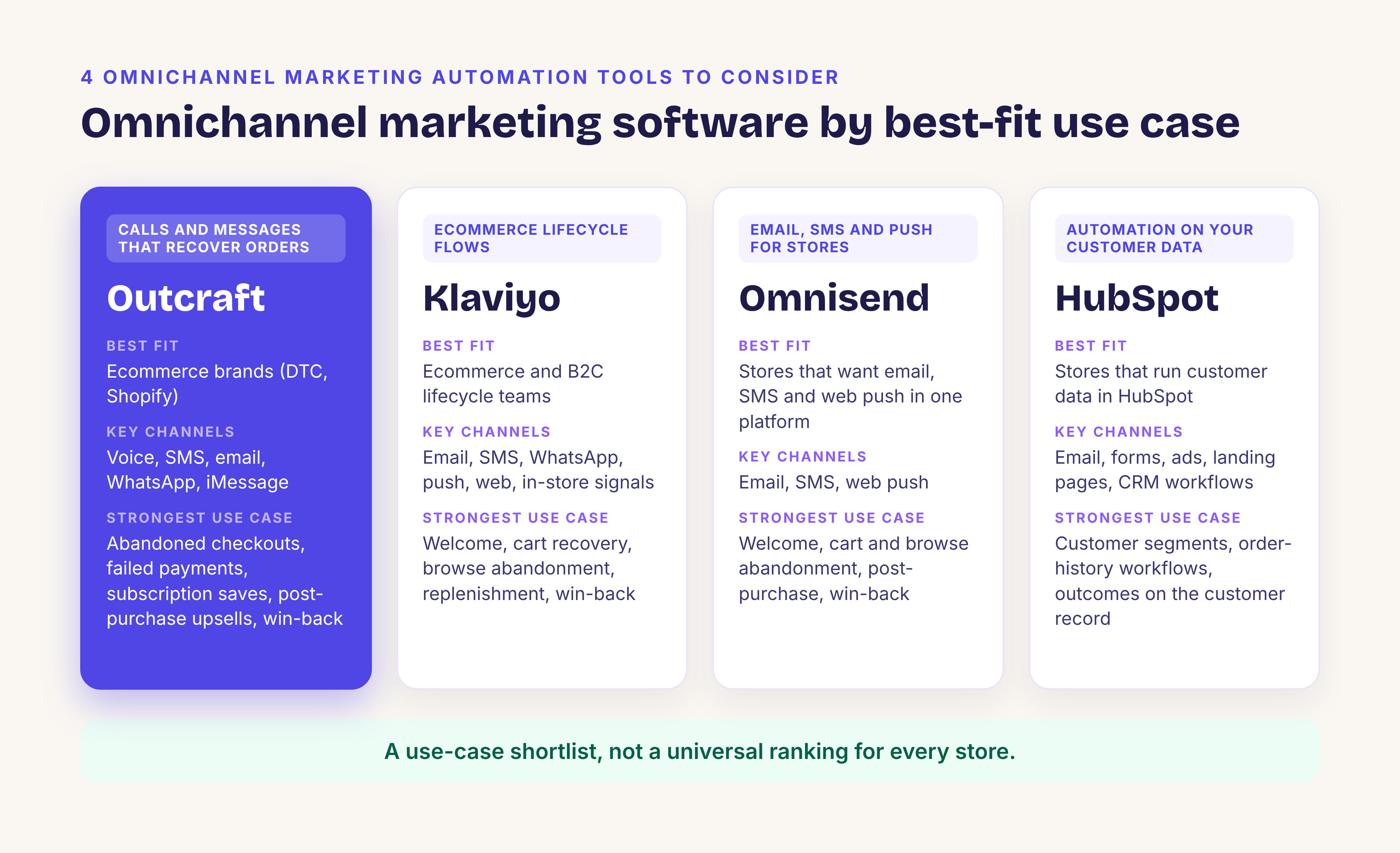
Outcraft publishes this guide. Klaviyo, Omnisend and HubSpot all integrate with Outcraft; each is described from its own documentation, checked on November 25, 2026.
Your customers rarely move in a straight line.
A subscriber might ignore a failed-payment email, miss a call, then update her card from a text. A DTC shopper might abandon checkout, answer a WhatsApp question, click an email, and buy after a follow-up call.
That is the real job of omnichannel marketing automation: keep your next move connected to the customer’s last signal.
You probably already use more than one channel. The problem is that email, SMS, ads, calls, WhatsApp, support, and sales often act like separate campaigns. The customer sees repetition. Your team sees manual handoffs. Revenue moments get missed.
This guide covers what omnichannel marketing automation is, how it works, when it is worth it and which tools fit which teams.
TL;DR
- Omnichannel marketing automation connects your customer data, triggers, and messages so each touchpoint reacts to what the customer just did.
- Your goal is to coordinate the right next action across calls, SMS, email, WhatsApp, iMessage, ads, sales, and support.
- I would start with one or two high-value journeys: abandoned checkout recovery, failed payments, subscription saves, win-back, or post-purchase upsell.
- I would put Outcraft first when calls and messages need to recover orders across voice, SMS, email, WhatsApp and iMessage. Klaviyo, Omnisend and HubSpot fit lifecycle flows, email-SMS-push in one platform, and stores that keep customer data in HubSpot.
What is Omnichannel Marketing Automation?
Omnichannel marketing automation coordinates personalized customer messages across connected channels using shared customer data, triggers, and journey logic. For a store, that means email, SMS, WhatsApp, iMessage, and calls working from one shopper profile, so each touch reacts to the shopper’s last action.
In simple words: your system knows what a customer just did, chooses the right next action, and avoids conflicting messages.
That could mean your shopper gets a call minutes after abandoning a USD 300 checkout, your shopper exits recovery after buying, or your subscriber gets a save offer the moment she clicks cancel.
The automation layer matters because your customer’s journey is no longer channel-specific. McKinsey notes that more than half of B2C customers engage with three to five channels each time they make a purchase or resolve a request in its omnichannel marketing explainer (August 2022).
Shopify makes the same point from a commerce angle: omnichannel marketing uses connected touchpoints to create a consistent customer experience in its guide to omnichannel marketing.
Automation is what turns that idea into something you can actually run.
Omnichannel vs Multichannel vs Single-Channel Automation
Using many channels is not the same as coordinating them. Omnichannel is about shared context.
| Approach | What it means | Data connection | Customer experience | Example |
|---|---|---|---|---|
| Single-channel automation | One channel is automated | Data usually stays inside one tool | Consistent in one channel, disconnected elsewhere | Email-only abandoned cart sequence |
| Multichannel marketing | Multiple channels are active | Channels may use different lists, rules, or reporting | Customer may receive duplicate or conflicting messages | Email campaign plus separate SMS blast |
| Omnichannel automation | Channels coordinate around one customer journey | Shared profile, consent, behavior, lifecycle stage, and rules | Each message reflects the latest customer action | Abandoned checkout → AI call → checkout link by text → email if unanswered → stop on purchase |
In multichannel marketing, your customer can buy and still receive a discount reminder because the SMS tool did not know that the ecommerce platform recorded a purchase.
In omnichannel marketing automation, the purchase updates the profile, exits recovery, suppresses retargeting, and starts a post-purchase sequence.
That is the standard I would aim for: better coordination, not more noise.
Also Read: How Outcraft handles abandoned checkout recovery
How Omnichannel Marketing Automation Works
Good omnichannel automation follows a simple loop. You collect data, unify it, trigger a journey, choose the channel, send the message, measure the result, and improve the logic.
1. Customer data is collected across touchpoints
Your system starts with signals: website visits, cart and checkout events, orders, subscription changes, failed payments, email clicks, SMS replies, call outcomes, WhatsApp conversations, support tickets, and ads.
2. Data is unified into a customer profile
Raw events need to resolve into a shopper profile with contact details, consent, preferences, order history, subscription status, source, and last action.
Klaviyo positions omnichannel automation around a shared customer profile and real-time data across email, SMS, WhatsApp, push, web, and in-store channels on its omnichannel automation page.
Omnisend builds its automation around email, SMS, and web push in one workflow, with segmentation based on shopping behavior, on its features page. I checked both vendor pages on November 25, 2026.
Collect the fields that help you decide the next best action.
3. Segments and triggers decide who enters each journey
Segments define who enters. Triggers define when your journey starts.
Common triggers include abandoned checkouts, failed payments, cancel clicks, replenishment timing, and lapsed buyers. Segments add guardrails, such as enrolling only opted-in customers, high-value customers, or churn-risk subscribers.
4. Journey logic chooses timing, channel, and message
This is where omnichannel marketing automation becomes operational. Your journey should answer what just happened, what the customer needs next, which channel fits, what should be suppressed, and when a human should step in.
For example, I would not let a USD 400 abandoned checkout sit in a generic email queue. A cart that size has earned a phone call, so the first action is a call within minutes. If she misses it, a text follows with her checkout link. The moment the order lands, every reminder stops.
The same logic applies to lower-value carts. Your cart recovery flow might start with email, use SMS for opted-in shoppers, use WhatsApp where consented, stop after purchase, and trigger a post-purchase upsell later.
5. Analytics improve the journey over time
Your omnichannel reporting should measure journey outcomes, not just channel activity.
Track conversion rate, orders recovered, revenue, saved subscriptions, repeat rate, retention, LTV, opt-outs, reply rate, and incremental lift.
Clicks and opens are diagnostic signals, not the business outcome.
Common Omnichannel Marketing Automation Examples for Ecommerce
If you are deciding where to start, I would look at revenue moments where coordination usually pays back:
- Abandoned checkout recovery: cart event → email/SMS recovery → WhatsApp, where consented → suppress after purchase.
- Failed payment recovery: card declined → AI call → secure card-update link by text during the call → stop on success.
- Subscription cancellation save: cancel click → call that says she can still cancel, then offers a pause, skip or new cadence → confirm by text.
- Re-engagement: dormant segment → relevant message → alternate channel fallback → exit when the customer returns.
- Post-purchase upsell: purchase → education → review request → relevant cross-sell or upsell.
- Back-in-stock: product restocked → email to waitlist → SMS to opted-in shoppers who didn’t open → stop on purchase.
Benefits of Omnichannel Marketing Automation
Connected automation makes your customer experience more relevant, reduces duplicate messaging, improves timing, and lets each channel do its job. Email handles depth. SMS and WhatsApp handle time-sensitive follow-up. Calls handle urgent or high-value revenue moments.
It also improves measurement. You can see which sequence, channel, and handoff contributed to the outcome.
When Omnichannel Automation Is Worth It, and When It Is Overkill
Omnichannel marketing automation is worth it when you have multiple active customer channels, enough customer data to personalize responsibly, manual handoffs causing slow follow-up, and revenue moments that depend on fast response.
I would call it overkill if you only use one or two simple channels, your consent and data foundations are weak, you have no clear lifecycle journeys, or your team cannot maintain journey logic after launch.
Start with one revenue moment and one measurable outcome.
How to Build an Omnichannel Marketing Automation Strategy
Start by choosing the customer moments that deserve automation. Do not try to automate every channel at once.
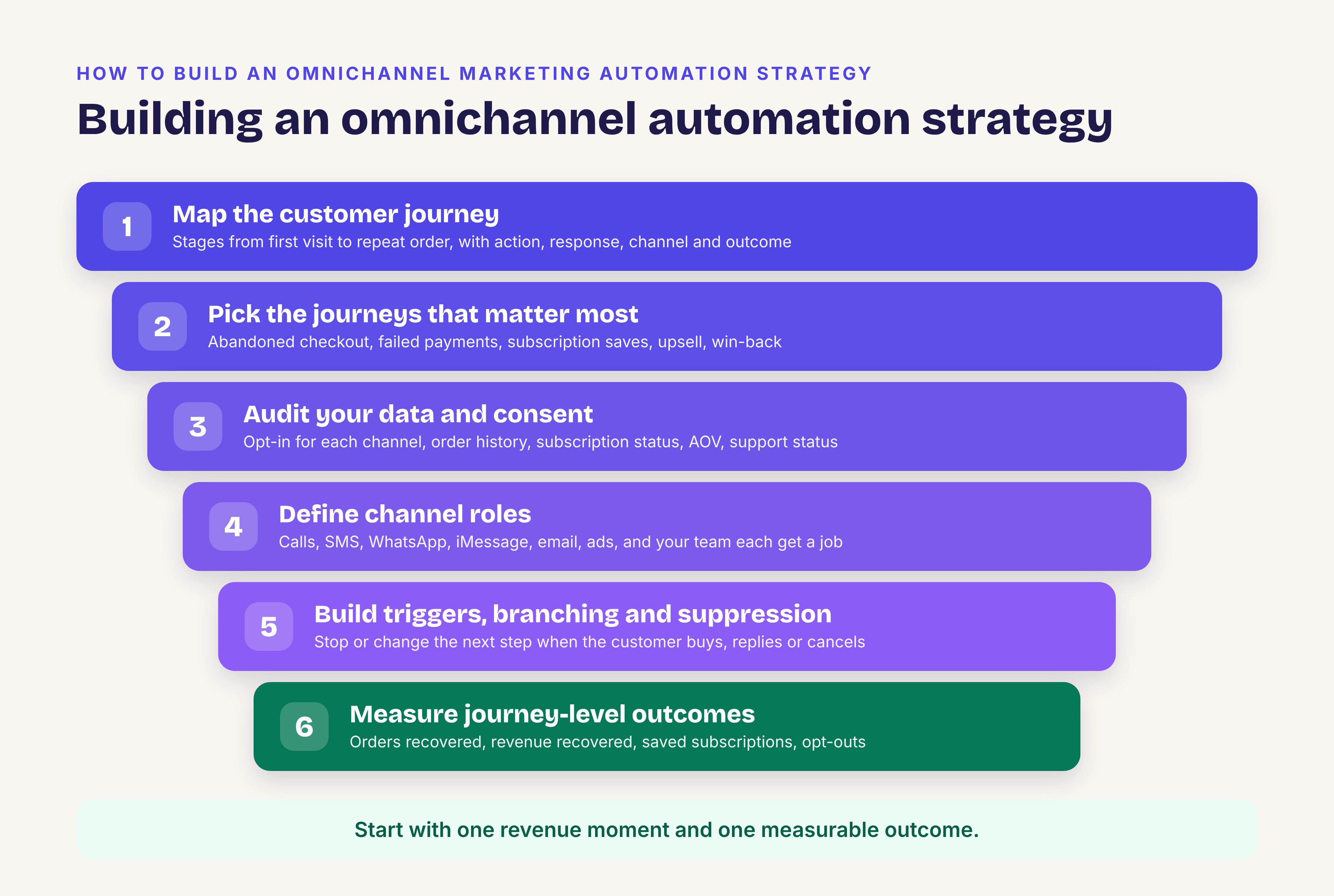
Step 1: Map the customer journey
Map the stages that matter to you: awareness, consideration, first order, second order, subscription, retention, and win-back.
For each stage, write down the customer action, your team’s current response, the channel used, and the desired outcome.
Step 2: Pick the journeys that matter most
I would choose from abandoned checkout recovery, failed-payment recovery, subscription saves, post-purchase upsell, and win-back.
Step 3: Audit your data and consent
List the data you need to run each journey: contact fields, opt-in status for each channel, order history, subscription status, AOV, and support status. Bad data creates bad outreach faster.
Step 4: Define channel roles
Give each channel a job.
- Calls: urgent, high-intent, high-value conversion moments, only for shoppers with a phone number and calling consent.
- SMS, WhatsApp, and iMessage: reminders, confirmations, recovery, and time-sensitive follow-up. For WhatsApp tool picks, see WhatsApp business automation tools.
- Email: education, nurture, product details, and longer-form messaging.
- Ads: retargeting, suppression, and audience reinforcement.
- Your team: VIPs, disputes, and custom orders, where automation should not own the decision.
Step 5: Build triggers, branching, and suppression rules
Triggers start the journey. Branches adapt to it. Suppression rules protect your customer experience. If the customer buys, replies, updates her card, cancels, or asks for support, the next action should change.
Step 6: Measure journey-level outcomes
Measure what the journey exists to produce.
For checkout and payment recovery, track orders recovered, revenue recovered, and opt-outs. For subscription saves, track saved subscriptions.
See how Outcraft coordinates calls, SMS, email, WhatsApp, and iMessage around revenue moments
How We Evaluated the Tools
I built this shortlist from public product documentation and current market positioning as of November 25, 2026.
I evaluated each tool on channel coverage, data/profile depth, journey builder, segmentation, analytics, integrations, ease of implementation, and best-fit use case.
This is a use-case shortlist, not a universal ranking for every store. I placed Outcraft first because it maps most directly to this article’s criteria for calls and messages that recover orders: voice AI plus follow-up across calls, SMS, email, WhatsApp, and iMessage; lifecycle coverage across checkout recovery, failed payments, subscription saves, and win-back; and outcome orientation around recovered orders and saved subscriptions. If you only need ecommerce lifecycle flows, email, SMS, and push in one platform, or automation built on customer data in HubSpot, you may reasonably choose one of the other tools.
4 Omnichannel Marketing Automation Tools to Consider
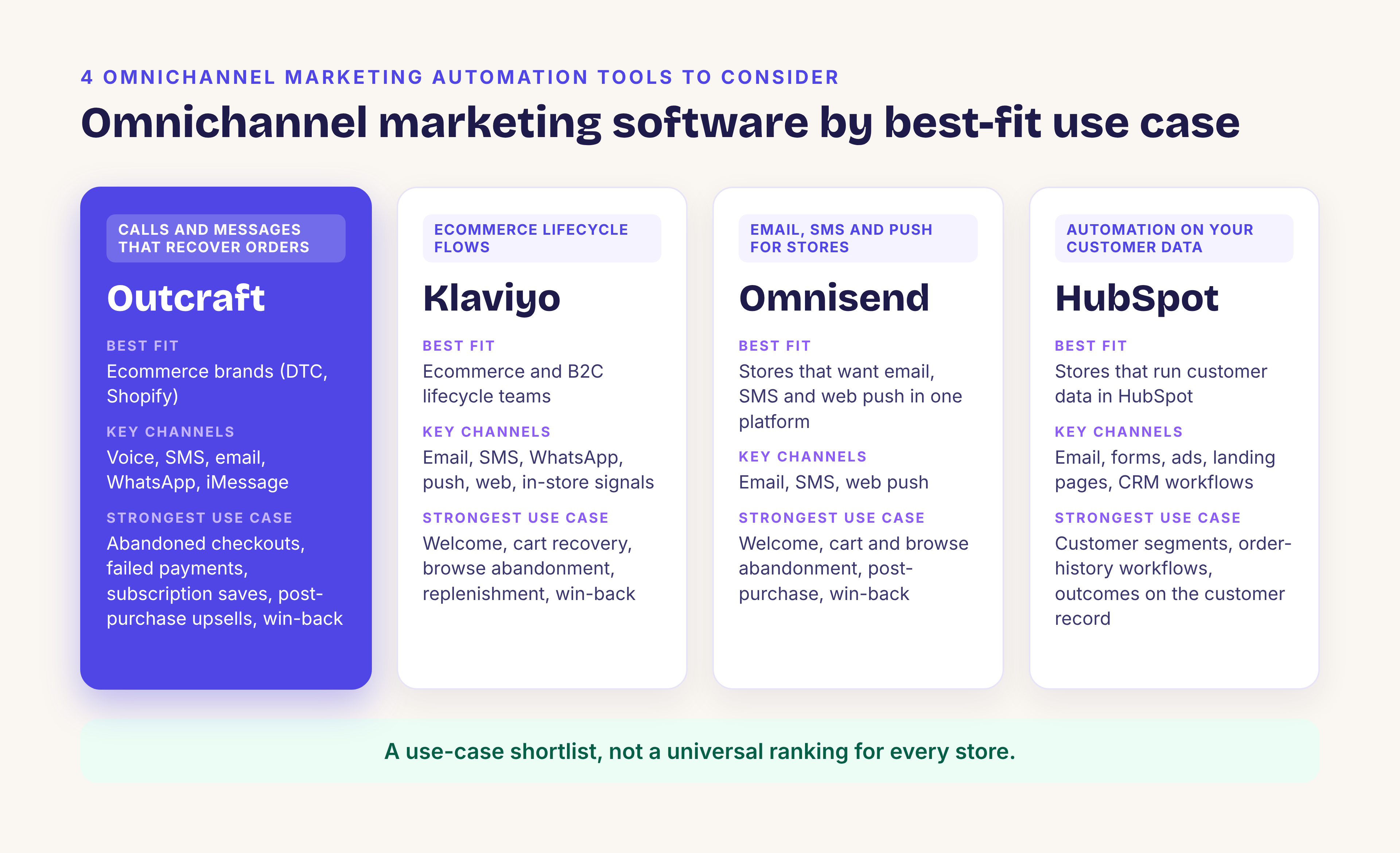
| Tool | Best fit | Key channels | Strongest use case | Watch-out | Evidence basis |
|---|---|---|---|---|---|
| Outcraft | Ecommerce brands (DTC, Shopify) | Voice, SMS, email, WhatsApp, iMessage | Abandoned checkouts, failed payments, subscription saves, post-purchase upsells, win-back | Not a basic newsletter or CRM suite | Product pages, help center and customer stories |
| Klaviyo | Ecommerce and B2C lifecycle teams | Email, SMS, WhatsApp, push, web, in-store signals | Welcome, cart recovery, browse abandonment, replenishment, win-back | Less focused on calls that recover orders | Product pages describe shared profiles, segmentation, and cross-channel commerce automation |
| Omnisend | Stores that want email, SMS, and web push automation in one platform | Email, SMS, web push | Welcome, cart and browse abandonment, post-purchase, win-back | No calls | Product pages describe email, SMS, and push in one automation workflow with behavior-based segmentation |
| HubSpot | Stores that run customer data in HubSpot | Email, forms, ads, landing pages, CRM workflows | Customer segments, order-history workflows, call and message outcomes synced to the customer record | Depth depends on plan and integrations | Docs describe workflows, branching, enrollment, CRM updates, and performance tracking |
1. Outcraft: best for calls and messages that recover orders
Outcraft is the AI Sales Agent for Ecommerce Brands. I would choose it when the outcome you care about is recovered revenue, not a scheduled campaign.
Here is how Outcraft works on an abandoned checkout, the moment I would start with. A shopper leaves at the payment page. Within minutes, Outcraft’s AI sales agent calls her, finds out what stopped her, and sends the checkout link by SMS, WhatsApp, or iMessage while she is still on the line. If she misses the call, the conversation continues on any of the five channels: voice, SMS, email, WhatsApp, and iMessage. When she buys, every reminder stops.
The same agent handles failed payments, subscription saves, post-purchase upsells, and win-back. One agent, one memory: the agent that saved the checkout is the one that earns the second order, so your customer never has to explain herself twice.
Outcraft works alongside Klaviyo and Omnisend, not instead of them. Your flows keep running, and Outcraft picks up the shoppers they didn’t convert.
Best for: DTC and Shopify stores that want calls and messages working together on abandoned checkouts, failed payments, subscription saves, post-purchase upsells, and win-back.
Watch-out: I would not pick Outcraft if you only want a traditional newsletter tool, a broad CRM suite, or a self-serve email template library. It is strongest when your workflow has a clear revenue moment and a next best action across voice and follow-up channels. It is also not a chatbot, a support bot, or a one-moment cart-recovery app.
2. Klaviyo: best for ecommerce and B2C lifecycle marketing
Klaviyo is a strong fit if you run ecommerce or B2C lifecycle marketing with rich purchase data.
It centers on email, SMS, WhatsApp, push, web, in-store signals, shared profiles, segmentation, and AI-assisted channel decisions.
Best for: you need lifecycle flows like welcome series, abandoned cart, browse abandonment, win-back, post-purchase, replenishment, and churn-risk journeys.
Watch-out: Klaviyo is stronger as a commerce lifecycle platform than as a layer of calls and messages that recover orders. If calls are central for you, evaluate that gap carefully.
3. Omnisend: best for email, SMS, and web push automation for stores
Omnisend is a strong fit if you want email, SMS, and web push working in an all-in-one automation platform built for stores. I like it most for brands that want solid flows without turning setup into a project.
Its automation editor combines email, SMS, and web push in a single workflow, with pre-built flows for welcome series, cart and browse abandonment, post-purchase, and win-back, plus segmentation based on shopping behavior, as its features page outlines.
Omnisend is also an Outcraft integration, so shoppers whose flows don’t convert can still get a call.
Best for: you run a Shopify store and want email, SMS, and push managed together instead of stitched across separate tools.
Watch-out: Omnisend does not make calls. If a phone call is part of how you recover high-value checkouts, you will need a voice layer alongside it.
4. HubSpot: best for stores that keep customer data in HubSpot
HubSpot fits when your store already keeps customer data in HubSpot, and you want automation close to that record: order history, customer segments, forms, landing pages, and reporting.
HubSpot’s automation tools include forms, marketing emails, workflows, record updates, segmentation, branching logic, and performance tracking across its hubs. HubSpot is also an Outcraft integration: call and message outcomes sync back to the customer record, so your team sees what the shopper said before anyone picks up the phone.
Its Marketing Hub automation page also frames workflows around segment-based enrollment, behavior-driven triggers, coordinated email/ad/page scheduling, A/B testing, and results tracking in HubSpot’s marketing automation overview.
Best for: you want customer segments built on order history, workflows that react to purchases, and every call and message outcome on the customer record.
Watch-out: omnichannel depth depends on your plan, hub mix, integrations, and data hygiene. Costs can rise as your customer list and feature needs grow.
Mistakes to Avoid
- Do not treat omnichannel as “send the same message everywhere.” That is channel duplication, not orchestration.
- Do not buy a platform before fixing customer data. Automation cannot make messy data trustworthy.
- Do not ignore consent and preferences. Build opt-in, opt-out, preference, and suppression logic before scaling.
- Do not measure only opens and clicks. Measure recovered orders, saved subscriptions, repeat rate, opt-outs, and incremental lift.
- Do not over-automate high-value customers. Automation should summarize complex cases and hand them to your team. For a custom order, a dispute, or a VIP several tickets deep, a briefed human still wins.
- Do not forget frequency caps and exit rules. If the customer replies, buys, cancels, or enters support, your system needs to stop or change the next step.
FAQs
What is the difference between omnichannel and multichannel marketing automation?
Multichannel marketing uses several channels. Omnichannel marketing automation coordinates those channels around one customer profile, shared behavior, and journey logic.
The difference is context. In omnichannel automation, one channel knows what happened in the others, so you are not treating the customer like a stranger every time.
What channels should omnichannel marketing automation include?
Use the channels your customers actually use: calls, SMS, email, WhatsApp, iMessage, push notifications, ads, live chat, and support workflows.
Do small businesses need omnichannel marketing automation?
Not always.
If you are a small team, start with one or two high-value journeys. If revenue depends on failed-payment recovery, abandoned cart recovery, or retention outreach, omnichannel automation can make sense earlier.
What data do you need before setting it up?
At minimum, you need contact details, consent for each channel, order history, subscription status, AOV, and the last action that should trigger the journey. For advanced journeys, add support status, preferences, and churn or LTV signals.
How do you measure omnichannel marketing automation success?
Measure journey outcomes first: orders recovered, revenue recovered, saved subscriptions, repeat rate, and opt-outs. Use channel metrics to diagnose why your journey performed the way it did.
What is an example of an omnichannel customer journey?
Say a shopper abandons a USD 300 checkout. She gets a call from Outcraft within minutes, receives the checkout link by text if she misses it, and every reminder stops once she buys.
That is omnichannel because each touchpoint reacts to the latest customer action.
What is the best omnichannel marketing automation tool?
I would choose Outcraft for calls and messages that recover orders across voice, SMS, email, WhatsApp, and iMessage. I would look at Klaviyo for ecommerce lifecycle flows, Omnisend for email, SMS, and push, and HubSpot for stores that keep customer data in HubSpot.
The best tool depends on your store, data maturity, active channels, and the revenue outcome you need to automate.
What is omnichannel ecommerce?
Omnichannel ecommerce means a store’s website, messages, calls and support all work from the same customer record, so each touch reflects what the shopper did last. A shopper who buys on the site stops getting cart reminders by text, and a support reply already knows about her last order.
How do you map an omnichannel customer journey?
List each stage from first visit to repeat order, then write down the customer’s action, your current response, the channel you use and the outcome you want at each stage. The gaps between those columns show you which journey to automate first.
Do you need a customer data platform (CDP)?
Not to start: most stores can run their first journeys from the customer profiles in Shopify, Klaviyo or HubSpot, and add a CDP only when data from many systems needs merging.
Conclusion
Omnichannel marketing automation is not about using more channels. It is about connecting customer context across the full journey.
I would start with the revenue moments that already matter: abandoned checkouts, failed payments, cancel clicks, second orders, win-back, and post-purchase upsell. Define the trigger, choose the channel role, build the suppression rules, and measure the outcome.
Then choose the platform that matches your workflow.
If your goal is calls and messages that recover orders across voice, SMS, email, WhatsApp, and iMessage, I would put Outcraft first on the shortlist.
If your goal is ecommerce lifecycle flows, email, SMS, and push in one platform, or automation built on customer data in HubSpot, then Klaviyo, Omnisend, or HubSpot may be the better fit.
When an Abandoned Checkout Is Worth a Phone Call
Bring one week of abandoned checkouts. We’ll show you what a phone call recovers.
About the people behind this article

Will Nauseda, author
CEO and co-founder of Outcraft, the AI sales agent for ecommerce brands. Before Outcraft he was the first sales hire at Omnisend and chief commercial officer at Warmy.io. He wrote The State of the AI Sales Call 2026, Outcraft's study of more than 2 million AI calls to online shoppers.

Edvinas Rakickas, reviewer
Edvinas Rakickas is the Co-Founder and CRO of Outcraft, the AI sales agent for ecommerce brands. He co-founded the company at the end of 2025 with Will Nauseda and Rytis Dereskevicius and runs its revenue side.
Summarize with AI
Follow Outcraft on Google
Pick Outcraft as a preferred source, and our articles are more likely to show up for you in Google's Top Stories.
Add Outcraft as a preferred source