



A Klaviyo abandoned cart flow sends a timed series of emails to shoppers who leave your store without ordering. I build it on the Checkout Started trigger for shoppers who reached checkout and add a second flow on Added to Cart for earlier exits. Then I filter out anyone who places an order and space about three messages over two days. For high-value checkouts, I add a phone call within minutes while the flow keeps running.
Sounds easy, right? It is, on paper. Most Klaviyo abandoned cart setups start from the same template, and the template is fine. What goes wrong is everything around it: a trigger that fires for the wrong shopper, a missing filter that keeps emailing someone who already paid, a first email that lands too soon or too late.
So I'll take them one at a time, in the order I'd fix them, and then show you where a phone call picks up what email can't.
Key takeaways
- Run two flows: Checkout Started for shoppers who reached checkout, Added to Cart for earlier exits, with a filter that keeps each shopper in only one of them.
- Every recovery flow needs the filter "Placed Order zero times since starting this flow", so a shopper who buys hears nothing more.
- Send the first email two to four hours after checkout starts and the next one 20 to 48 hours later, with two to three messages in total.
- For high-value checkouts, a phone call within minutes can answer the question the emails can't.
What a Klaviyo Abandoned Cart Flow Does
A Klaviyo abandoned cart flow is an automated series of emails, and optionally texts, that Klaviyo sends after a shopper adds products to their cart or starts checkout without ordering. The flow starts from a store event, filters out shoppers who buy, and usually runs over one to three days.
Klaviyo cart abandonment flows come in two kinds. A flow triggered by Added to Cart targets abandoned carts, and one triggered by Checkout Started targets abandoned checkouts (Klaviyo Help Center, updated October 2026). The need is real: Baymard Institute puts the documented average cart abandonment rate at 70.22%, across 50 studies (Baymard Institute, checked November 2026). That's roughly seven in ten carts walking out the door.
A cart flow is also different from a browse abandonment flow. A browse flow follows interest; a cart flow follows a shopper who chose products.
On Shopify, both events come from your store once Klaviyo is connected, and Checkout Started syncs quickly. Klaviyo warns that some other platforms sync it only hourly.
Abandoned Cart or Checkout Started: Which Trigger to Use
Checkout Started reaches shoppers who entered checkout; Added to Cart reaches earlier exits, so most Shopify stores run both with the checkout flow taking priority. Klaviyo recommends the same: one flow per trigger, because a shopper who starts checkout has shown stronger intent.
| Klaviyo abandoned checkout flow | Klaviyo added to cart flow | |
|---|---|---|
| Trigger metric | Checkout Started | Added to Cart |
| Fires when | The shopper enters contact details at checkout and moves to the next step | The shopper adds a product to the cart |
| Who it reaches | Shoppers closest to paying | Earlier, more casual exits Klaviyo can identify |
| Shopify setup | Works once Klaviyo is connected | Needs the Klaviyo app embed and the Track behavioral events setting |
| Filters | Placed Order zero times since starting this flow | The same, plus Checkout Started zero times since starting this flow |
- Choose the abandoned checkout flow first if you can only build one this week. It reaches the shoppers closest to paying.
- Add the Added to Cart flow once the checkout flow is live and behavioral tracking is on. Klaviyo's Added to Cart guide for Shopify says to test that the event is syncing before you build it.
- Run both with suppression. The Checkout Started filter on the cart flow means a shopper who moves on to checkout leaves the cart flow and hears only from the checkout flow. Nobody needs two reminders about the same jacket.
How to Build a Klaviyo Abandoned Cart Flow, Step by Step
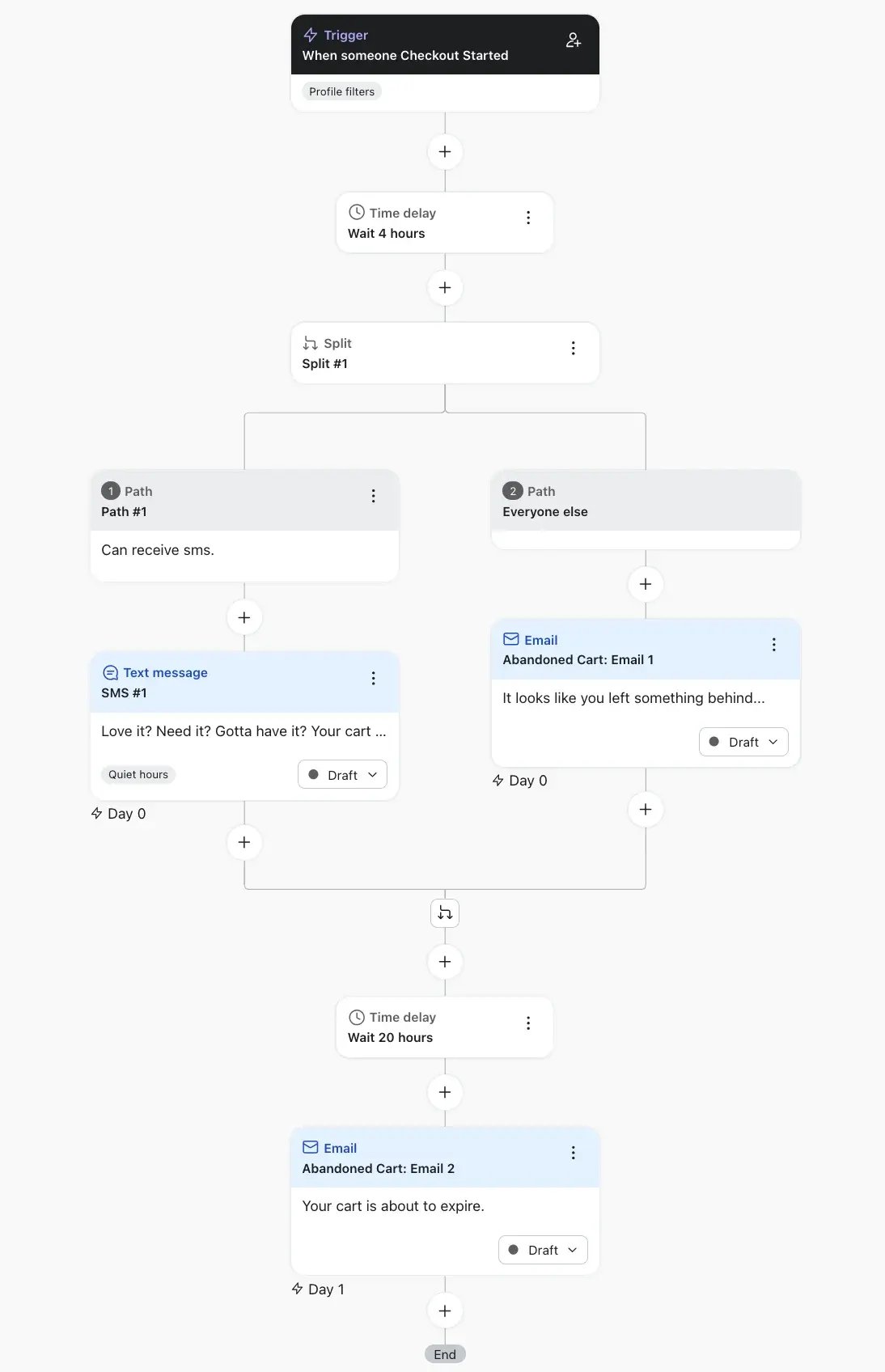
Build the flow on the Checkout Started trigger, filter out shoppers who placed an order, and space about three emails over two days. Connect Shopify to Klaviyo before you start. None of this is hard. It's just easy to skip a step, and the skipped step is usually the one that costs you.
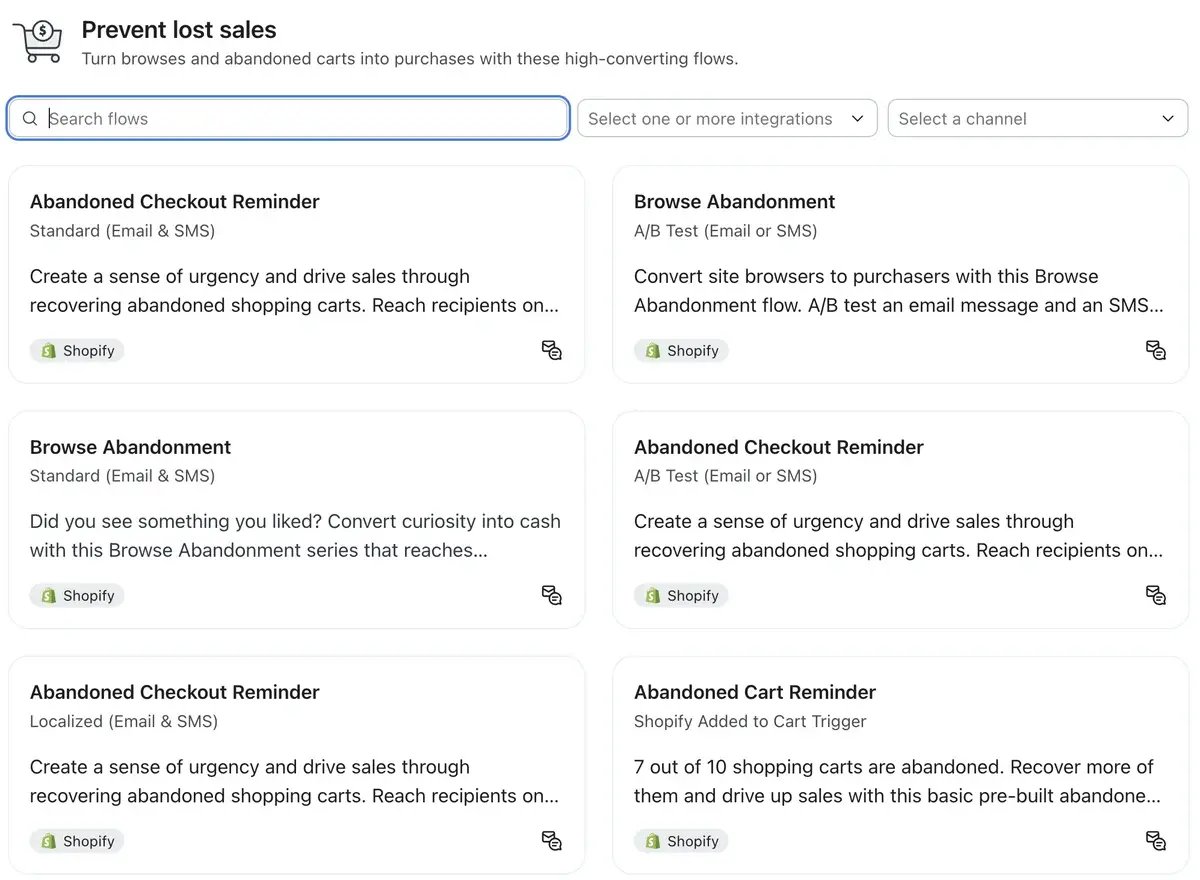
- Start from the pre-built flow. In the flow library, pick Abandoned Checkout Reminder (Standard) for your integration. I always start here, because the pre-built emails already carry the dynamic product block and the return-to-cart button. Expected result: a draft flow triggered by Checkout Started.
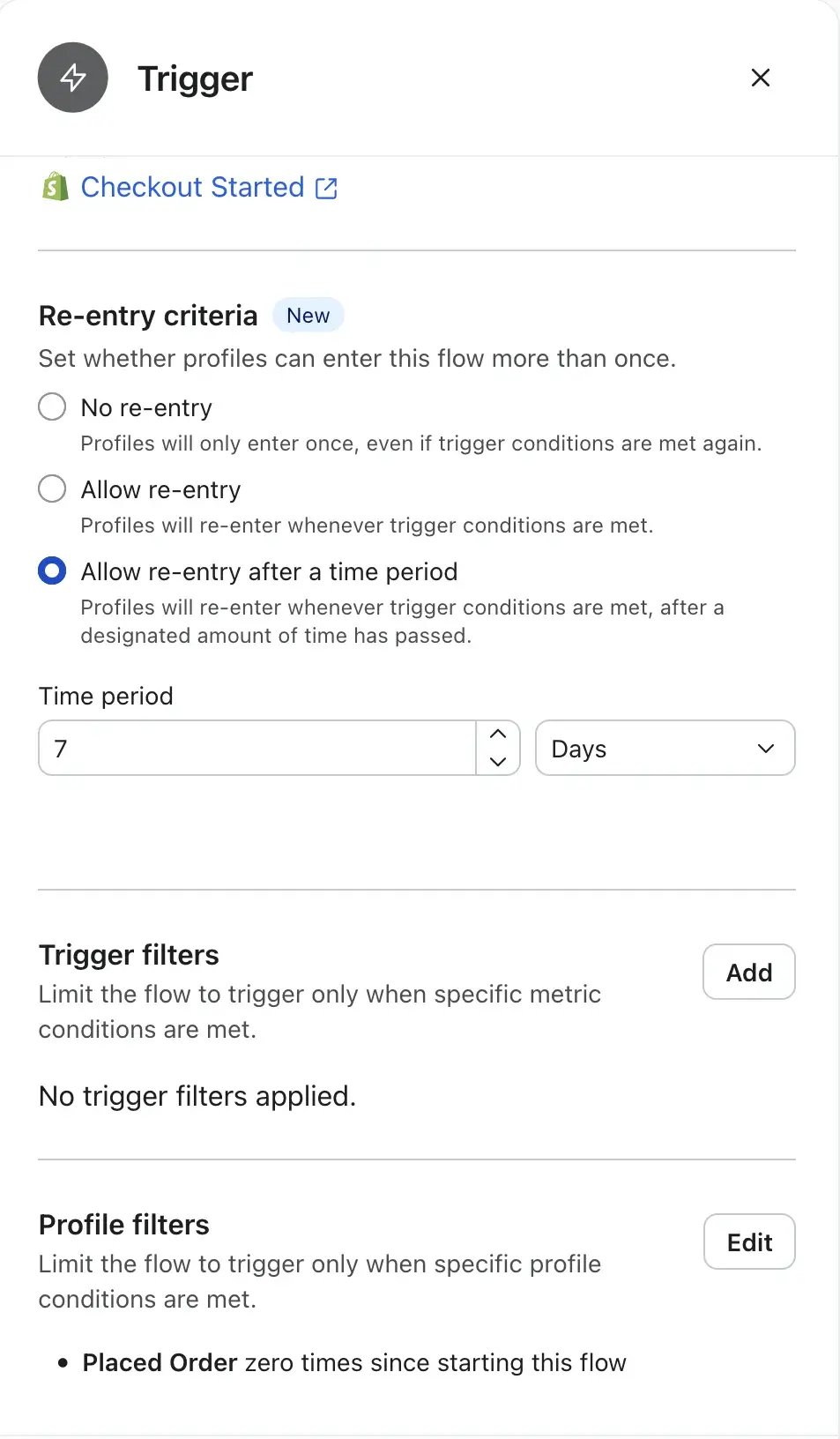
- Confirm the trigger. Click the trigger and check that it reads Checkout Started. For your second flow, search the library for Abandoned Cart Reminder with the Shopify Added to Cart trigger.
- Add the purchase filter. Click the trigger, choose Profile Filters, then Add a Flow Filter, then What someone has done (or not done). Set it to Person has Placed Order zero times since starting this flow. Klaviyo checks filters before every message, so a shopper who buys after email one never gets email two. Expected result: many shoppers marked Skipped: Fails Flow Filters, which Klaviyo calls normal. Don't panic when you see that number. It's the filter doing its job.
- Set the re-entry criteria. In the trigger panel, under Re-entry criteria, choose Allow re-entry after a time period and set 7 days, the pre-built flow's default. Without a limit, a shopper who abandons twice in a week gets the series twice.
- Suppress the cart flow. On the Added to Cart flow only, add Checkout Started zero times since starting this flow.
- Set the first time delay. Klaviyo's pre-built flows wait 4 hours before the first message. If you sell on a platform that syncs hourly, Klaviyo advises at least 1 hour and 15 minutes.
- Decide on Smart Sending per message. Smart Sending skips a message when the shopper got one on the same channel recently. The default windows are 16 hours for email and 24 hours for SMS (Klaviyo Help Center). I keep it on in the Added to Cart flow, and on the checkout flow I check how many first emails it skipped.
- Turn off Shopify's abandoned checkout email. Klaviyo tells you to turn off your platform's own abandoned cart messages to avoid duplicates. In your Shopify admin, go to Apps, then Messaging, then Automations, open Abandoned checkout and turn it off. If your store still uses the legacy email, the setting sits under Settings, then Checkout (Shopify Help Center). It's the easiest step to forget, and your shopper is the one who notices.
- Set the flow live. Click Update status, choose Live, then Save. Expected result: new checkouts start appearing in each message's recipient activity.
Timing and Number of Emails
For timing, send the first email two to four hours after checkout starts and the second 20 to 48 hours later. An optional third goes close to the 48-hour mark. Klaviyo's research across thousands of its customers found that two to three messages perform best (Klaviyo Help Center).
| Message | When it sends | Its job |
|---|---|---|
| Email 1 | 2 to 4 hours after Checkout Started | Show the cart and one button back to it |
| Email 2 | 20 to 48 hours after email 1 | Answer the likely objection |
| Email 3 (optional) | Close to 48 hours after abandonment | Last touch, with any incentive only here |
| Text (optional) | Within 48 hours of abandonment, one per shopper in the US | A short nudge with the cart link |
Price changes the clock. Klaviyo points out that big-ticket items like mattresses take more consideration than shoes, so a longer delay can work better. Nobody decides on a mattress in two hours. Shoes, maybe. With a high AOV, I'd test the longer end of each window first.
For a benchmark, Klaviyo's 2026 abandoned cart report covers more than 110,000 Klaviyo customers. It puts average revenue per recipient at $6.77 for email and $4.48 for text, with the top 10% at $13.70 and $8.69 (Klaviyo, October 2026).
Flow timing planner: choose your order value and channels to get a Klaviyo abandoned cart flow schedule.
What to Write in Each Email, Exactly
Each email gets one job: the first reminds, the second answers an objection, and the last makes the final offer, with a discount only there, if at all. Give one email three jobs and it does none of them well.
Email 1: The reminder. Put the products front and center. Klaviyo's dynamic block shows each item's image, title, quantity and price, and it repeats for every product, so a shopper with four items sees all four. Skip recommendations; Klaviyo advises they distract from the cart.
A line I like: "Your [product] is saved. Pick up where you left off."
Email 2: The objection answer. The shopper saw the reminder and still didn't pay, so something stopped them. Did they forget? Probably not. More likely, the shipping cost surprised them or the size felt like a gamble. Answer the usual suspects: shipping cost, delivery date, returns and sizing, and invite replies to a real inbox. "Not sure about sizing or delivery? Reply to this email and we'll sort it out."
Email 3: The last touch. Should the flow include a discount? I'd ask why first. Klaviyo warns that a coupon in the first email can train shoppers to abandon carts for a code. If you use one, put it in the final email or offer it only to first-time buyers. If price was never the blocker, a discount just gives away margin. A discount can't answer a sizing question.
Adding SMS to the Flow
Add one text after the first time delay, behind a consent split, so only shoppers who agreed to texts receive it.
- Turn on SMS in Klaviyo and collect consent that covers cart reminders, with double opt-in on the list, and add the cart-reminder wording to your SMS terms (Klaviyo Help Center).
- After the first time delay, add a conditional split: If someone can or cannot receive marketing, then Person cannot receive, then text message marketing.
- Put the text on the No path, so it reaches shoppers who can receive SMS, then rejoin the paths.
- For US recipients, Klaviyo requires double opt-in, one text per recipient and a send within 48 hours of abandonment (Klaviyo Help Center). Quiet hours can delay the send.
A text that works: "Hi [name], your [product] is still in your cart at [store]: [link]. Reply STOP to opt out." Texting rules differ by market, so I'd check consent with your legal team before the text goes live. One text, sent well, does more than three sent hopefully. Budget for it too: Klaviyo moved texts to per-message dollar pricing on July 13, 2026, and rates vary by country (Klaviyo Help Center).
Where AI Calls Fit Alongside the Flow
For high-value checkouts, a phone call within minutes can answer the question an email can't. A Klaviyo email can't hear that a shopper needed delivery before Friday. A phone call can, and it can answer before the shopper moves on.
I call a checkout only when the cart is high-value, the shopper left a phone number with calling consent, and no order has landed yet. Lower-value carts let the flow try first. Email-only checkouts stay on email. I'd rather call fewer shoppers well than call everyone badly.
Outcraft is the AI Sales Agent for Ecommerce Brands. It calls and messages shoppers to recover abandoned checkouts and failed payments, and to earn the second order. Outcraft and Klaviyo work together: the flow keeps running, and the call reaches high-value checkouts while the shopper is still deciding.
- The flow runs as built. Klaviyo sends its emails and its text on your timing.
- The call goes out first. Outcraft connects to Klaviyo, and a Klaviyo flow can start an Outcraft campaign, so I'd split the checkout flow by cart value and start the call within minutes for high-value carts. The agent asks what stopped the order and answers from your store's policies. Then it texts the checkout link during the call.
- Everything stops on purchase. The Placed Order filter ends the emails, and the call campaign stops when the order lands. An opt-out on one channel covers every channel. One no is enough.
That stop rule is how you avoid double-messaging between calls and emails. Across the platform: 13M+ AI calls and $74M+ recovered for 200+ brands (per outcraft.ai). Omnisend has equivalent flows, and the same setup works through the Omnisend integration.
For a high-value custom order or a VIP several tickets deep, a briefed human still wins. The longer case is why abandoned cart emails alone fall short.
Here’s what that sounds like on a real call: the shopper raises an objection, the agent answers it and sends the checkout link before the call ends.
How to Measure Klaviyo Flow Performance
Read flow revenue against your attribution window, then check it with a holdout. Attributed revenue shows which orders the flow touched, not how many it caused. Those are two very different numbers.
- Read revenue per recipient. Compare it across email 1, 2 and 3 in each message's analytics. Rewrite the weakest one first, then test the fix with Klaviyo's A/B test on that one message, changing one variable at a time.
- Know your window. Klaviyo uses last-touch attribution. New accounts default to 5 days for email opens and clicks, 5 days for SMS clicks and 12 hours for SMS deliveries (Klaviyo Help Center). You can change these in Settings, then Attribution, up to three times in 30 days.
- Run a holdout. Add a conditional split with a random sample at the top of the flow, and let one path exit with no messages. Compare the order rate of the two groups over the same period; the gap is what the flow adds.
- Benchmark once. Compare against Klaviyo's $6.77 email average, then judge the flow on your own holdout.
Frequently Asked Questions
Why isn't my Klaviyo abandoned cart flow sending?
Check that every message is Live, since Draft sends nothing and Manual queues shoppers for review. Then confirm the trigger metric is receiving events, the filters aren't excluding everyone, Smart Sending isn't skipping the message and the shopper has consent for that channel. Klaviyo also notes that an event recorded 6 hours or more after it happened won't trigger a metric-triggered flow. Each message's recipient activity shows the skip reason.
What's the difference between an abandoned browse and an abandoned cart flow?
A browse abandonment flow starts when a shopper views a product and adds nothing; a cart flow starts when they add to cart or start checkout. The cart shopper has shown more intent. Run both, and build the cart flow first.
How many emails should a Klaviyo abandoned cart flow have?
Usually three. Klaviyo's research found that two to three abandoned cart messages perform best, so more rarely add orders.
Should I turn off Shopify's abandoned checkout email if I use Klaviyo?
Yes. Klaviyo recommends turning off your platform's abandoned cart messages so shoppers only hear from Klaviyo. In your Shopify admin, open the Abandoned checkout automation under Apps, then Messaging, then Automations, and turn it off.
What is Smart Sending in Klaviyo?
Smart Sending skips a message when the shopper already received one on the same channel within a set window: 16 hours for email and 24 hours for SMS by default. Each channel keeps its own window, so an email doesn't block a text. You can change the windows in Settings, and turn Smart Sending off for any single flow message.
What is Klaviyo's default attribution window?
New Klaviyo accounts credit an order to a message within 5 days of an email open or click, 5 days of an SMS click, or 12 hours of an SMS delivery, using last-touch attribution. You can change the windows in Settings, then Attribution, up to three times in 30 days.
Can I send abandoned cart texts in Klaviyo?
Yes, to shoppers who agreed to cart reminders. In the US the list must use double opt-in, and you can send one text per shopper within 48 hours of abandonment. I'd check the consent wording with your legal team before the first text goes out.
Does Outcraft replace my Klaviyo flow?
No. Your flow keeps running for every shopper, and for high-value checkouts Outcraft calls within minutes and texts the checkout link. Both stop when the order lands.
Run the Flow, and Call the Checkouts Worth a Conversation
Your Klaviyo flow is the baseline, and I'd never tell you to switch it off. Get the triggers, filters and timing right, and it does most of the work. Most, not all. For high-value checkouts, Outcraft calls within minutes and texts the checkout link before the call ends, while the flow keeps working on everyone else.
Bring one week of abandoned checkouts. We'll show you what a phone call recovers.
About the people behind this article

Will Nauseda, author
CEO and co-founder of Outcraft, the AI Sales Agent for Ecommerce Brands. Before Outcraft he was the first sales hire at Omnisend and chief commercial officer at Warmy.io.

Edvinas Rakickas, reviewer
Edvinas Rakickas is the Co-Founder and CRO of Outcraft, the AI Sales Agent for Ecommerce Brands. He co-founded the company at the end of 2025 with Will Nauseda and Rytis Dereskevicius and runs its revenue side.
Summarize with AI
Follow Outcraft on Google
Pick Outcraft as a preferred source, and our articles are more likely to show up for you in Google's Top Stories.
Add Outcraft as a preferred source