



Shopify abandoned cart recovery starts in your admin. Shopify records every checkout where a shopper entered contact details and didn’t pay, and its built-in automation sends them a link back to finish the order. Turn it on, tune the timing and the message, filter out the bot checkouts, then add a second channel for your high-value checkouts.
Now picture the shopper on the other side of that checkout.
It’s late, they’ve filled a $300 cart with your best sellers, typed in their email and reached the payment page. Then their phone buzzes. Tab closed. Shopify saw every step, and that order can still come back. Whether it does depends on a few settings most stores never touch, starting with an email that, out of the box, only goes to shoppers who subscribed to your marketing.
Then the questions start.
Is that checkout a real person or a bot?
Is one email enough for a $300 order?
I’ll answer both, step by step, as Shopify works today.
Key takeaways
- Abandoned checkouts live under Orders > Abandoned checkouts. A cart that never reached checkout leaves no contact details, so there’s nothing to recover.
- The automation now lives in the Shopify Messaging app, and out of the box it only emails marketing subscribers. Check whether you can widen that.
- Some of those checkouts are bots. Shopify catches part of them, not all, so keep them out of your numbers.
- One email is a fine start. For checkouts worth $200 or more, add a channel that can answer the shopper back, with the right consent.
What Shopify Counts as an Abandoned Checkout
A Shopify abandoned checkout is a checkout where the shopper entered an email or phone number, then left before paying. Shopify saves it in your admin and can send a recovery message with a link straight back to that saved checkout. Carts abandoned before checkout never get recorded, so this route can’t recover them.
The clock matters too. According to the Shopify Help Center, a checkout counts as abandoned once it sits unpaid for more than ten minutes after the shopper adds their email. No contact details, no record.
I see store owners mix these three up all the time, so here they are side by side:
| Record | Who creates it | Contact details saved | Shows in the admin | Can you send a recovery link |
|---|---|---|---|---|
| Abandoned cart | Shopper adds products, never starts checkout | No | No | No |
| Abandoned checkout | Shopper enters contact details at checkout, doesn’t pay | Yes | Orders > Abandoned checkouts | Yes, automatically or by hand |
| Draft order | Your staff, inside the admin | Whatever staff enter | Orders > Drafts | Staff send an invoice instead |
One more thing: abandoned checkouts don’t stay forever. Shopify deletes them after three months, and you can’t delete one by hand. Export anything you want to keep, or turn it into a draft order and leave it open.
Where to Find Abandoned Carts in Shopify
You’ll find abandoned carts in your Shopify admin under Orders > Abandoned checkouts. Notice the word: checkouts, not carts. Shopify only lists shoppers who reached checkout and typed in their contact details.
Running a WooCommerce store instead? Our WooCommerce abandoned cart recovery guide covers where abandoned carts hide there, since WooCommerce doesn’t list abandoned checkouts out of the box.
- From your Shopify admin, go to Orders.
- Click Abandoned checkouts. Each row shows the shopper, the cart value, an Email status and a Recovery status.
- Click a checkout number to open it. The Timeline shows every payment attempt, so you can tell a declined card from a shopper who simply walked away.
- Check the Blocked view too. Checkouts that Shopify Payments stopped as high risk sit there, away from the main list.

If you need to send one recovery email by hand, open the checkout and click the shopper’s email under the customer information. Shopify opens your email client with the checkout link already in the body. I use this when a shopper writes in asking for their cart back, or when an order is too big to leave to an automation.
One warning, straight from Shopify: anyone who opens that link can continue the checkout, and you can’t expire it. So send it only to the shopper who left it.
How to Set Up Shopify’s Abandoned Cart Email
You set up Shopify’s abandoned checkout automation in the Shopify Messaging app, under Apps > Messaging > Automations. It emails each shopper a link back to their saved checkout, and Shopify marks the checkout recovered once they pay.
If you’ve used Shopify for a while, you might remember this setting under Settings > Checkout. It moved. The legacy email still works for stores that haven’t switched, but Shopify says it will be removed.
Switching is permanent, so read the steps once before you click anything.
- From your Shopify admin, go to Apps > Messaging, then click Automations.
- Click View templates and pick the Abandoned checkout template. If you used the legacy email, your old settings come with you.
- Click Edit > Edit email. Beside To:, choose All customers if your consent rules allow it. By default, Shopify emails only marketing subscribers, which quietly skips most first-time buyers.
- Rewrite the subject line, preview text and body so they sound like your brand, not like a template. Keep the checkout link above the fold.
- Set the wait time. Switching carries over your old timing, and a second abandoned checkout automation starts at a 10-hour wait. Either way, you change the wait in Shopify Flow from the automation’s Edit screen.
- Click Turn on automation, review the summary and click Continue.
Expected result: the next real abandoned checkout gets your email after the wait you set, and its row in Orders > Abandoned checkouts updates the moment the shopper pays.

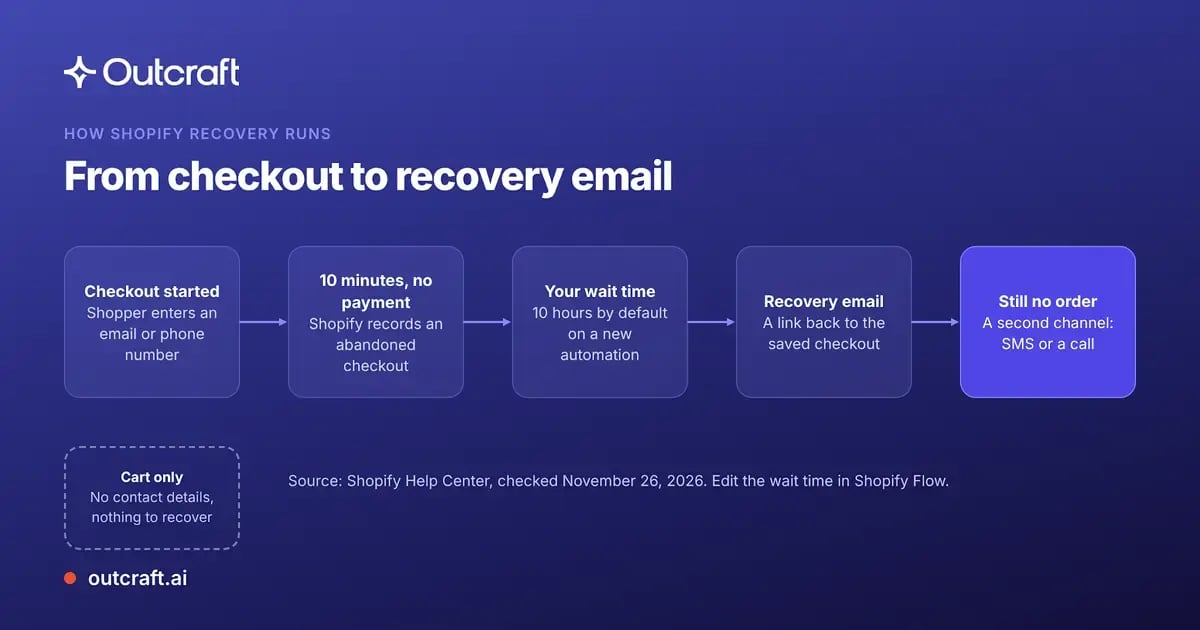
My take on timing. A ten-hour wait is safe, not fast. For impulse buys, I’d test a first touch closer to one hour. For considered purchases, the longer wait is fine. Nobody buys a sofa in sixty minutes.
Can Shopify send abandoned checkout texts? Yes. Since May 19, 2026, the Shopify changelog lists SMS automation templates in Shopify Messaging, including one for abandoned checkouts. Texts need SMS marketing consent, though, so loop in your legal team before the first one goes out.
Should you put a discount in the Shopify abandoned cart email? Shopify suggests adding one here. I’d hold it for the last touch. A discount answers a price objection, and most shoppers leave for other reasons: shipping cost, delivery date, sizing or a failed card. Ask why first, and save the code for your last message.
Why Your Store Shows Fake Abandoned Checkouts
Seeing so many fake abandoned checkouts that the list stops making sense? You’re not alone. Bots are usually behind them: scripts that test stolen cards, scrape prices or hammer checkout pages. They inflate your abandoned checkout count, so keep them far away from your recovery numbers.
The good news: Shopify already filters part of the problem. The Shopify Help Center says some suspected card testing and bot activity never reaches your list. The catch: not all of it gets caught. So when strange checkouts start piling up, these habits keep them in check:
- Spot the pattern. Bot checkouts love repeats: the same cheapest product, the same postcode, the same nonsense names, often from countries you don’t ship to.
- Keep hCaptcha on. Shopify turns it on by default under Online Store > Preferences > Spam protection. It guards forms and account pages, not the checkout itself.
- Ship only where you sell. With tight shipping zones, an out-of-region bot can’t even get a shipping rate.
- Use bot protection on Shopify Plus. Plus stores can ask Shopify Plus Support to turn on bot protection, a scheduled checkpoint of up to 60 minutes. Shopify built it for flash sales, not everyday fraud.
- Clean your numbers. You can’t delete an abandoned checkout, so tag or filter suspected bots in your export before you work out a recovery rate.
- Keep bots out of your flow. Emailing a fake address hurts your sender reputation. Calling or texting one just burns money.
Where Shopify’s Built-In Recovery Stops
Shopify’s built-in recovery is a solid baseline for Shopify cart abandonment, but it stops at one message. For a $40 cart, that’s often enough. For a $400 cart, one email that can’t answer a single question leaves real money on the table.
Here’s where it falls short:
- It talks one way. The shopper can’t reply “will this arrive by Friday?” and get an answer.
- The timing is fixed. One wait, one email. You only get more steps if you build them yourself in Shopify Flow.
- Consent narrows the reach. The new automation emails marketing subscribers by default, and the legacy email has nowhere to go when the shopper typed only a phone number.
- Some channels sit outside it. Shopify POS, the Shop app and third-party sales channels don’t get the automation.
- “Recovered” is generous. Shopify counts a checkout as recovered if the shopper pays after the email, even if they never clicked it. Great for the dashboard, less great for the truth.
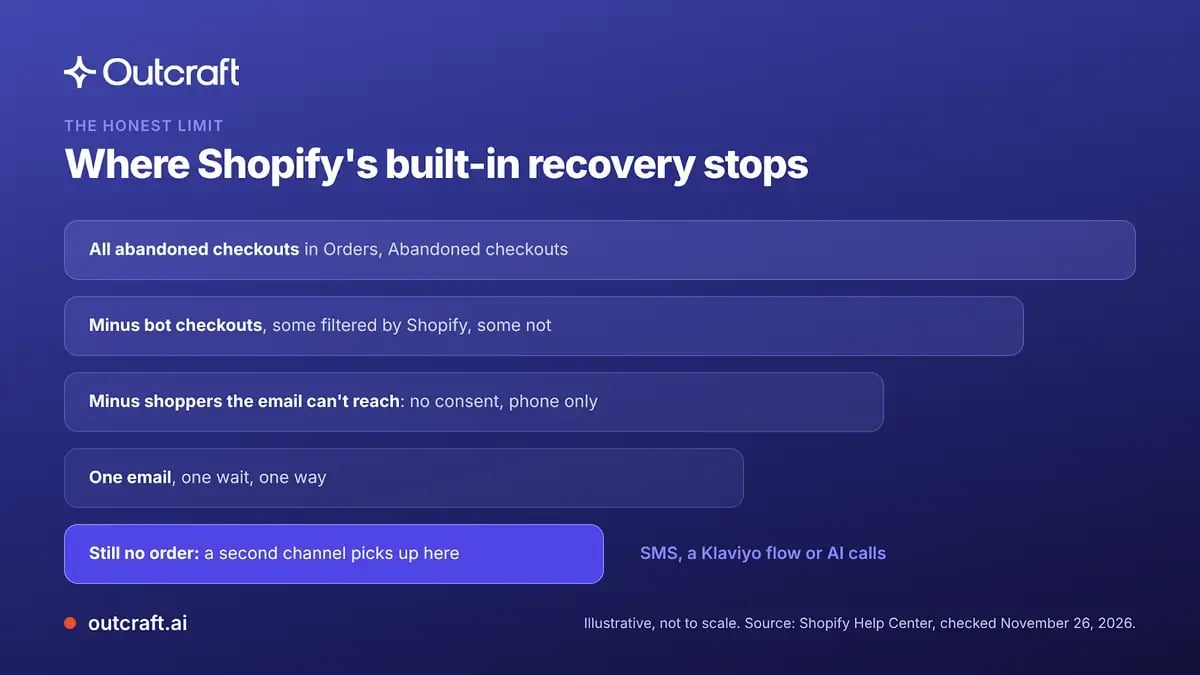
My verdict? Keep the built-in email. It costs nothing and catches the easy wins. Just don’t treat it as your whole recovery plan once your average order value climbs.
Reach calculator: estimate how many abandoned checkouts Shopify’s built-in email never reaches.
What to Add for High-Value Checkouts
For high-value checkouts, you need abandoned cart recovery for Shopify that does what one email can’t: send a sequence, reach the shopper’s phone, or hold a real conversation. These three additions cover most stores. For a wider list, see our roundup of the best abandoned cart recovery apps.
A Klaviyo flow. This is the usual next step after Shopify’s email. A flow gives you several emails, branches by cart value and much better segmentation.
An SMS step. Shopify Messaging sends texts now, and dedicated SMS apps give you more control. Texts get seen fast. The catch is consent: only shoppers who agreed can get them.
AI calls. A phone call is the only channel on this list that hears the objection and answers it on the spot.
Outcraft is the AI Sales Team for Ecommerce Brands. It calls and messages shoppers to recover abandoned checkouts and failed payments and to earn the second order. Outcraft installs on Shopify and contacts the checkouts the built-in email didn’t convert. If the shopper is ready on the call, the agent can transfer them to a secure payment line. They key in their card there, so the agent never hears the number. Otherwise, it texts the checkout link.
It works alongside Klaviyo too, picking up the shoppers your flow missed. So far, it has made 13M+ AI calls and recovered $74M+ for 200+ brands (per outcraft.ai). Read how AI calls for abandoned Shopify checkouts work, or see the full abandoned checkout recovery process.
Not sure which to pick? Let your order value decide:
- Choose Shopify’s email alone if your average order sits under about $50 and most shoppers don’t need answers.
- Choose a Klaviyo flow if you want several touches and segments, and email is already your strongest channel.
- Add SMS if your shoppers opt in to texts and mostly buy on mobile.
- Add AI calls if your average order is $200 or more, shoppers leave with questions about fit, delivery or payment, and you collect phone numbers with calling consent.
This walkthrough shows what recovery beyond email looks like on Shopify, with an AI sales agent calling abandoned checkouts back.
Reduce Abandonment Before It Happens
The cheapest checkout to recover is the one nobody abandons. Here’s how Shopify reduces cart abandonment with features you already have:
- Shop Pay. Returning shoppers check out with saved details instead of typing it all again.
- Shipping costs upfront. Show the shipping price or a free-shipping threshold on product and cart pages. Surprises belong in gift boxes, not at checkout.
- Guest checkout. Don’t force account creation before payment.
- Clear delivery dates. Put a date on the product page and you answer the most common question before anyone asks it.
Peak season changes everything, so read our guide to Black Friday cart abandonment before the rush hits.
How to Measure Shopify Abandoned Cart Recovery
Measure Shopify abandoned cart recovery in recovered checkouts and recovered revenue, with bots taken out first. Email engagement tells you about the email. It tells you nothing about the money.
- Pull the list. Export abandoned checkouts from Orders > Abandoned checkouts for one full week.
- Remove the bots. Drop anything that matches the bot patterns before you count a single checkout.
- Count recovered checkouts. Use the Recovery status column, then add up the order value of every recovered checkout.
- Check the automation report. Shopify Messaging shows performance data on the Automations page. The Abandoned checkouts emails report, in the Growth section of your admin, shows sessions, orders and sales from your reminders.
- Split by channel and cart value. Track email, SMS and calls separately, and compare checkouts under $100 with those over $200.
Do this every week for a month, and you’ll know exactly which channel earns its place. To see how many orders the reminders actually caused, hold back a random group; our abandoned cart recovery guide shows how.
Frequently Asked Questions
What is the average cart abandonment rate on Shopify?
Shopify doesn’t publish a store-wide abandonment rate. The go-to benchmark is Baymard Institute’s documented average of 70.22%, based on 50 studies (list last updated September 22, 2025). That’s roughly seven in ten carts. Your own rate depends on your products, traffic and checkout.
Does Shopify send abandoned cart emails automatically?
Only once you turn the automation on. You switch on the Abandoned checkout automation in Shopify Messaging, and by default it emails marketing subscribers only. Check the To: field so it reaches every shopper you’re allowed to contact.
Can I see abandoned carts if the shopper never started checkout?
No. Shopify only records checkouts where the shopper entered an email or phone number. A Shopify abandoned cart without contact details leaves nothing to follow up on.
Should I add a discount to Shopify’s abandoned checkout email?
Shopify suggests it, but not in the first message. Most shoppers leave over shipping cost, delivery timing, sizing or payment trouble, and a discount fixes none of those. Keep the code for your final touch, if you use one at all.
What’s the difference between a draft order and an abandoned checkout?
Your staff create draft orders inside the admin, usually for phone or custom orders, and send the customer an invoice. Shoppers create abandoned checkouts when they enter contact details at checkout and leave without paying. Shopify also suggests turning an abandoned checkout into a draft order if you need to keep it past three months.
Does Shopify Plus handle abandoned checkouts differently?
The abandoned checkouts list and the recovery automation work the same way on Shopify Plus. Plus stores can also request bot protection from Shopify Plus Support for flash sales.
Why didn’t my Shopify abandoned checkout email send?
Shopify skips the email when the shopper isn’t a marketing subscriber (on default settings), already bought, left a newer checkout, abandoned the Shop app, had a payment blocked as high risk, or when nothing in the cart is still available.
Can I change when Shopify sends the abandoned checkout email?
Yes. Edit the automation’s workflow in Shopify Flow from its Edit screen. Switching from the legacy email keeps your old timing, and a second automation starts at a 10-hour wait.
Where do I see how well Shopify’s abandoned checkout emails work?
The Abandoned checkouts emails report, in the Growth section of your admin, shows sessions, completed orders, conversion rate, sales and average order value from your reminders.
Recover the Shopify Checkouts Email Can’t
Shopify hands you the list, the link and one good email. Turn it on today, check the To: field, keep the bots out of your numbers, and add a channel that talks back once your orders get bigger.
Bring one week of abandoned checkouts. We’ll show you what a phone call recovers.
About the people behind this article

Will Nauseda, author
CEO and co-founder of Outcraft, the AI Sales Agent for Ecommerce Brands. Before Outcraft he was the first sales hire at Omnisend and chief commercial officer at Warmy.io.

Edvinas Rakickas, reviewer
Edvinas Rakickas is the Co-Founder and CRO of Outcraft, the AI Sales Agent for Ecommerce Brands. He co-founded the company at the end of 2025 with Will Nauseda and Rytis Dereskevicius and runs its revenue side.
Summarize with AI
Follow Outcraft on Google
Pick Outcraft as a preferred source, and our articles are more likely to show up for you in Google's Top Stories.
Add Outcraft as a preferred source